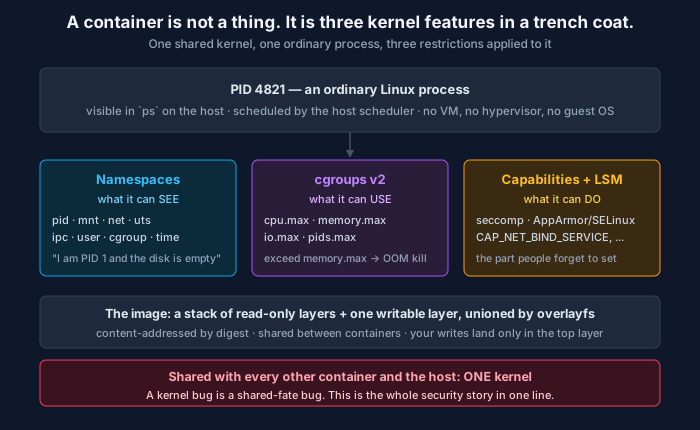
Three independent kernel features, one shared kernel. Every container behaviour you find surprising falls out of this picture.
There is no such thing as a container.
The Linux kernel has no container object. There is no container system call, no struct container in the source, nothing you can point at. What exists is a set of independent kernel features that, when applied together to an ordinary process, produce something that feels like a small isolated machine. Docker, containerd, Podman, and every Kubernetes runtime are programs that set those features up and then call execve.
This matters far more than trivia. Almost every confusing container behaviour — the OOM kill on a host with free memory, the process that thinks it has 96 CPUs, the image that is 1.2 GB despite deleting the build tools — is obvious once you know which kernel feature is responsible, and inexplicable if you are picturing a small virtual machine.
The one-sentence definition
A container is a process that has been given a restricted view of the system (namespaces), a cap on what it can consume (cgroups), a reduced set of privileged operations (capabilities and seccomp), and a root filesystem assembled from stacked image layers.
That is the whole thing. Nothing in that sentence is a container-specific invention; every part predates Docker. Docker’s contribution was packaging and, decisively, the image format.
Namespaces: what the process can see
A namespace wraps a global kernel resource so that processes inside it see their own instance of it. Linux has eight:
| Namespace | What it virtualises | What you notice |
|---|---|---|
pid | Process IDs | Your app is PID 1 inside, PID 4821 outside |
mnt | Mount table | A filesystem that looks nothing like the host’s |
net | Interfaces, routes, ports, firewall | Own eth0, own port space |
uts | Hostname and domain name | hostname returns the container ID |
ipc | System V IPC, POSIX queues | Cannot see another container’s shared memory |
user | UID/GID mappings | Root inside, unprivileged outside |
cgroup | cgroup hierarchy root | Cannot see the host’s cgroup tree |
time | Boot and monotonic clocks | Rarely used outside checkpoint/restore |
You can create one by hand and see it work:
# A shell in a new PID + mount + UTS namespace, no Docker involved.
sudo unshare --pid --mount --uts --fork --mount-proc bash
hostname container-demo
ps aux          # you will see two processes. The host has hundreds.
echo $$         # 1
That is a container’s isolation, in three lines, with no runtime installed.
Two consequences worth internalising:
PID 1 is a real job. The kernel treats PID 1 specially: it must reap orphaned children, and signals it does not explicitly handle are not applied by default. An application that ignores SIGTERM because it never installed a handler will sit there until the grace period expires and it is SIGKILLed — which is where “my pods take 30 seconds to terminate” usually comes from. Either handle SIGTERM in your application or run a minimal init like tini as PID 1.
The network namespace is the unit of networking, not the container. This is the entire explanation of the Kubernetes Pod. Containers in a Pod share one network namespace, so they reach each other on localhost and share a port space — and that is also why two containers in the same Pod cannot both bind :8080. A Pod is “a group of containers sharing namespaces”, nothing more mystical.
cgroups: what the process can use
Namespaces do not limit consumption. A perfectly namespaced process can consume every core on the box. Control groups are the separate mechanism that caps it, and in cgroups v2 they are plain files:
cat /sys/fs/cgroup/cpu.max      # "200000 100000" → 2 CPUs worth per 100ms period
cat /sys/fs/cgroup/memory.max   # bytes, or "max"
cat /sys/fs/cgroup/pids.max     # process count cap — your fork-bomb defence
Two behaviours cause most of the confusion here, and they are not symmetrical.
Memory is a hard wall. Exceed memory.max and the kernel OOM-kills inside that cgroup. The host’s free memory is irrelevant — the limit is the limit. In Kubernetes this surfaces as exit code 137 with reason OOMKilled. It is not a node capacity problem; it is a limit-versus-working-set problem.
CPU is throttling, not killing. cpu.max is a quota per period. Exceed it and your threads are paused until the next period. The service does not crash; it gets slower in a way that looks like a mysterious latency spike and does not correlate with load. Check cpu.stat:
cat /sys/fs/cgroup/cpu.stat | grep throttled
# nr_throttled 12043
# throttled_usec 91238000
A non-zero and climbing nr_throttled means your CPU limit is the reason for your p99, and no amount of profiling application code will show it. This is one of the highest-value metrics most teams do not alert on.
And the classic: most runtimes do not virtualise /proc. A process inside a container reading /proc/cpuinfo sees the host’s CPUs. So a JVM, a Go program setting GOMAXPROCS, or a worker pool sized from os.cpu_count() will happily configure itself for 96 cores while pinned to 2 — creating 96 threads that spend their lives fighting over a 2-core quota. Modern JVMs are container-aware and read the cgroup; most other runtimes need to be told explicitly. Set thread pools from the limit, not from the machine.
Capabilities and seccomp: what the process can do
The third restriction is the one teams skip, and it is the one that matters for security.
Traditional Unix has two privilege levels: root and not-root. Capabilities split root into about forty separate powers — CAP_NET_BIND_SERVICE to bind below port 1024, CAP_SYS_ADMIN for a long and alarming list, CAP_NET_RAW for raw sockets. Container runtimes drop most of them by default.
On top of that, seccomp filters the system call table itself. The default Docker profile blocks around 40 of the roughly 350 syscalls, and Kubernetes can apply RuntimeDefault to every workload. A Linux Security Module — AppArmor or SELinux — adds mandatory access control over files and operations.
The practical baseline, which costs nothing to adopt:
securityContext:
  runAsNonRoot: true
  runAsUser: 10001
  allowPrivilegeEscalation: false
  readOnlyRootFilesystem: true
  capabilities:
    drop: ["ALL"]
  seccompProfile:
    type: RuntimeDefault
drop: ["ALL"] then adding back only what you need is the correct posture. Most web services need nothing. And privileged: true disables essentially all of the above at once — it is not “a bit more access”, it is the off switch.
Layers: where the image comes from
The runtime story ends there. The image is a separate design, and it is the one Docker actually invented.
An image is an ordered stack of read-only tarballs, each identified by the SHA-256 digest of its contents, plus a JSON manifest. At runtime the layers are unioned by overlayfs into a single filesystem view with one writable layer on top. Reads fall through the stack; writes land in the top layer via copy-up.
Content addressing is why docker pull on a second image from the same base is nearly free: the shared layers are already present and identical by digest. It is also why the 12-factor “build once, run anywhere” property holds — a digest names exactly one set of bytes, forever.
Two consequences follow directly from “layers are immutable and stacked”:
Deleting a file does not shrink the image. RUN rm -rf /build-tools in a later layer writes a whiteout marker; the bytes remain in the earlier layer and still ship. The fix is to not add them in the same lineage — use a multi-stage build:
FROM golang:1.23 AS build
WORKDIR /src
COPY . .
RUN CGO_ENABLED=0 go build -o /app ./cmd/server

FROM gcr.io/distroless/static-debian12
COPY --from=build /app /app
USER 65532:65532
ENTRYPOINT ["/app"]
The compiler never enters the final image, because the final image starts from a different base and copies one file across.
Layer order is your build cache. Each instruction’s cache key includes the previous layer’s digest, so changing an early layer invalidates everything after it. Copying your whole source tree before installing dependencies means every source edit reinstalls the dependencies. Copy the manifest, install, then copy the source.
And pin by digest, not tag. A tag is a mutable pointer. FROM python:3.12 today and tomorrow can be different bytes, which makes builds irreproducible and makes a supply-chain substitution invisible. FROM python:3.12@sha256:... cannot change under you. This is the same argument as a lockfile, applied one level down — and it is the foundation everything in software supply chain security is built on.
What this buys you, and what it does not
The shared kernel is the whole trade. Containers start in milliseconds because there is no kernel to boot and no hardware to emulate — you are just clone()-ing a process with extra flags. That speed is the reason the entire orchestration ecosystem is possible.
It is also the security limit. Every container on a host is exposed to the same kernel, so a kernel vulnerability is shared fate. Namespaces and seccomp shrink the reachable surface; they do not make it a boundary you would bet a multi-tenant platform on. When you genuinely need that boundary — untrusted code, hostile multi-tenancy, or arbitrary code an AI agent decided to execute — the answer is a stronger isolation primitive: gVisor, which interposes a userspace kernel, or Firecracker, which runs a real microVM in a few tens of milliseconds. That last case is increasingly common and worth naming explicitly: a container is a resource boundary, not a trust boundary, and an agent’s code interpreter is untrusted code by definition.
The debugging table
Once the model is in place, the common failures map one-to-one onto the feature responsible:
| Symptom | Feature | What to look at |
|---|---|---|
Exit 137, OOMKilled | cgroup memory | memory.max vs actual working set |
| Latency spikes uncorrelated with load | cgroup CPU | cpu.stat → nr_throttled |
| App spawns 96 threads on a 2-CPU limit | /proc not namespaced | Size pools from the limit, not nproc |
| Pod takes 30s to terminate | PID namespace | PID 1 has no SIGTERM handler |
| ”Address already in use” between sidecars | Shared net namespace | Two containers, one Pod, one port |
| Image is 1.2 GB after deleting build tools | Layer immutability | Multi-stage build |
| Rebuild reinstalls all dependencies | Layer cache order | Copy manifest before source |
permission denied on a syscall | seccomp / capabilities | Audit the profile before adding privileged |
None of those are container bugs. They are namespace, cgroup, layer, and seccomp behaviours showing through — which is exactly what you would predict once you stop thinking of a container as a small machine and start thinking of it as a process someone put fences around.
The rule worth remembering
A container is one process with three restrictions and a stacked filesystem, running on a kernel it does not own. Namespaces decide what it sees, cgroups decide what it gets, capabilities and seccomp decide what it may do, and layers decide what ships. When something behaves strangely, identify which of the four is responsible — the answer is almost never “Docker is weird”.
Comments