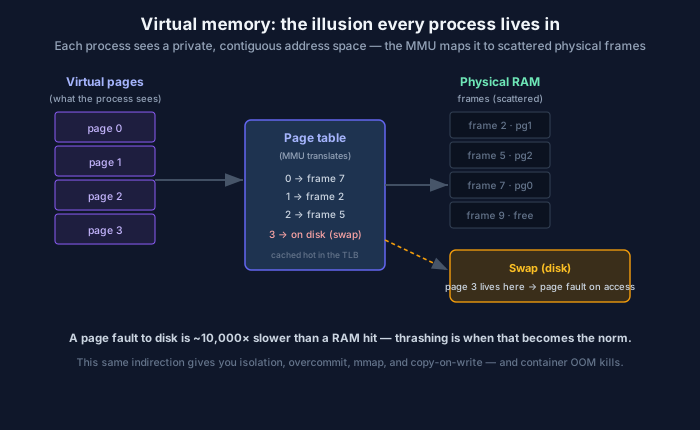
Every process sees a private, contiguous address space. The MMU quietly maps it to scattered physical frames — and sometimes to disk.
When your program reads memory address 0x7fff..., that address is a fiction. It isn’t a real location in a RAM chip; it’s a virtual address that the hardware translates, on every single access, into wherever the data actually physically lives. This translation layer — virtual memory — is one of the most consequential abstractions an operating system provides, and it quietly explains container OOM kills, mysterious latency cliffs, and even how modern LLM-serving engines manage GPU memory. This is a refresher on the lie and why it’s worth understanding.
The illusion, and why it’s worth the trouble
Every process gets its own virtual address space: a private, contiguous range of addresses that looks like it owns the whole machine. In reality, physical RAM is shared, fragmented, and smaller than what all the processes think they have. The OS and the MMU (memory management unit, in hardware) maintain a page table that maps fixed-size chunks of virtual memory (pages, typically 4 KB) to physical frames — as in the diagram, where virtual page 0 lives in physical frame 7, page 1 in frame 2, and so on, scattered wherever there was room.
This indirection buys you an enormous amount:
- Isolation and protection. Process A literally cannot address process B’s memory — there’s no virtual-to-physical mapping that would let it. This is a foundational security boundary.
- Contiguity without contiguity. Your program sees a clean, continuous heap; physically it’s scraps of frames all over RAM. No process has to care about fragmentation.
- Overcommit. The OS can promise more memory than physically exists, betting that not everyone uses all of theirs at once.
- Powerful tricks. Memory-mapped files (
mmap), copy-on-write (howfork()is cheap, and how containers share base image pages), and shared libraries all fall out of this mapping layer.
Page faults and the cliff
Because the OS can promise more than it has, some virtual pages aren’t in RAM at all — they’ve been pushed out to swap on disk (page 3 in the diagram). When a program touches such a page, the MMU can’t find it in RAM and raises a page fault: the OS pauses the program, fetches the page from disk into a frame, updates the page table, and resumes. The program never knows it happened.
Except it does know, in its latency. Recall the memory hierarchy: a RAM access is ~100 ns; a disk fetch is milliseconds. A page fault to disk is roughly 10,000× slower than a normal memory access. One occasional fault is invisible. But when memory pressure is high enough that the system is constantly paging things in and out — thrashing — the machine spends all its time shuffling pages and almost none doing work. This is the signature of “the server didn’t crash, it just became catastrophically slow and unresponsive.” Throughput falls off a cliff while CPU looks busy (it’s busy waiting on disk).
One more piece: translating every address through the page table would itself be slow, so the MMU caches recent translations in the TLB (translation lookaside buffer). A “TLB miss” is a real, measurable cost, and it’s why huge memory footprints with poor locality can slow down even when nothing is swapping — a reason “huge pages” exist.
Why this is alive and well in cloud and AI
Far from being a legacy OS topic, paging is central to how modern infrastructure behaves.
Container OOM kills are a virtual-memory story. A container has a memory limit (via cgroups). When the processes inside exceed it, the kernel’s OOM killer picks a victim and terminates it — the infamous OOMKilled / exit code 137 in Kubernetes. Understanding that your container’s “memory” is virtual, that limits are enforced by the kernel, and that overcommit means the system can hand out memory it can’t back, is exactly what you need to debug the single most common Kubernetes pod failure. The fix is usually right-sizing requests/limits and understanding your app’s real working set — concepts that only make sense through the paging lens.
Swap is usually the enemy in production. In latency-sensitive services, quietly swapping to disk turns a fast service into an unpredictable one, which is why many production and Kubernetes setups disable swap entirely — better to fail fast with an OOM kill than to thrash invisibly. Knowing why is knowing the page-fault cliff.
PagedAttention borrowed this idea wholesale. The technique behind vLLM that dramatically improved LLM-serving throughput is called PagedAttention for a reason: it manages the GPU’s KV cache using the same non-contiguous, paged allocation strategy the OS uses for RAM. Instead of demanding one big contiguous block of GPU memory per sequence (wasteful, fragmenting), it hands out small “pages” of KV cache on demand and maps them through a table. It’s virtual memory, reinvented for accelerators — one of the clearest cases of a decades-old OS idea directly powering a state-of-the-art AI system.
The takeaway
Virtual memory is the OS telling every process a comforting, contiguous lie and doing enormous bookkeeping to make it true. Most of the time you can happily ignore it. You stop being able to ignore it exactly when it starts to cost you — a page-fault storm that thrashes a host, an OOM kill that keeps restarting your pod, a GPU-memory scheme that decides your inference throughput. In every one of those cases, the page table in the diagram is the thing you’re really debugging. Learn the illusion, and its failure modes stop being mysteries.
Comments