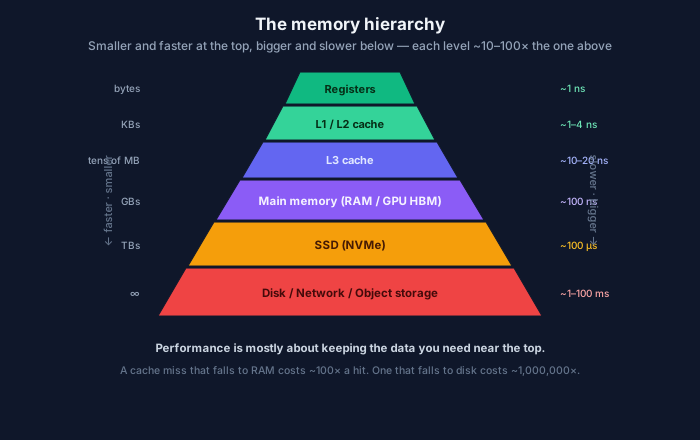
Each step down is roughly 10–100× slower and larger. Performance is mostly about staying near the top.
Here’s a fact that reorganizes how you think about performance: a modern CPU can do arithmetic in well under a nanosecond, but fetching a value from main memory takes around a hundred. The processor is so fast that, most of the time, it’s waiting for data to arrive. The memory hierarchy in the diagram is the industry’s entire answer to that gap, and understanding it explains why “make the data local” beats “get a faster chip” almost every time — including on the GPUs your models run on.
The hierarchy, one level at a time
Each level trades speed for size, and the jump between levels is enormous:
- Registers (~1 ns, bytes) — the handful of slots inside the CPU where actual computation happens.
- L1/L2 cache (~1–4 ns, KBs) — tiny, per-core, blisteringly fast.
- L3 cache (~10–20 ns, tens of MB) — shared across cores.
- Main memory / RAM (~100 ns, GBs) — big, and already ~100× slower than the caches. On a GPU, the analog is HBM (high-bandwidth memory), and it’s where your model weights and KV cache live.
- SSD / NVMe (~100 µs, TBs) — a thousand times slower than RAM again.
- Disk / network / object storage (~1–100 ms, effectively unlimited) — a million times slower than a cache hit.
Read those numbers as ratios, not absolutes. Every step down is a cliff. A piece of data you need that’s sitting in L1 is essentially free; the same data down in RAM costs ~100× more to reach; down on disk, ~1,000,000×. Your program’s speed is dominated by which level its data actually lives in when the CPU asks for it.
Locality: the property that makes caches work
Caches are only useful because real programs have locality of reference:
- Temporal locality — if you touched something, you’ll probably touch it again soon. (Keep it cached.)
- Spatial locality — if you touched an address, you’ll probably touch nearby addresses soon. (This is why memory moves in cache lines, typically 64 bytes — the hardware fetches a whole neighborhood, betting you’ll want the neighbors.)
This is why how you lay out data can matter more than how much work you do. The classic demonstration: iterating a 2D array row-by-row versus column-by-column does the identical number of operations, but the row-major version can be many times faster because it walks memory sequentially (great spatial locality, every cache line fully used) while the column-major version jumps around (cache miss on nearly every access). Same algorithm, same Big-O — wildly different wall-clock time, entirely because of the hierarchy.
It’s also why an array of structs versus a struct of arrays is a real performance decision, why linked lists (pointer-chasing all over memory) often lose to contiguous arrays despite identical complexity, and why “cache-friendly” is a design goal, not a micro-optimization.
Why this is the story in AI infrastructure
If there’s one place the memory hierarchy has gone from “good to know” to “the whole ballgame,” it’s ML systems. Modern accelerators are so fast at math that inference and training are overwhelmingly memory-bound, not compute-bound — the chip is starving, waiting for data.
The KV cache is a memory-hierarchy problem. During generation, the model keeps the key/value tensors of previous tokens in GPU HBM so it doesn’t recompute them. That cache is large and HBM is scarce, so serving throughput comes down to how well you manage this precious top-of-hierarchy space — which is exactly why systems like PagedAttention (vLLM) exist: they apply operating-system-style paging ideas to the KV cache to stop wasting HBM. That’s the memory hierarchy, borrowed straight from virtual memory.
FlashAttention is a locality optimization. Its whole insight is to restructure the attention computation so it keeps data in the GPU’s fast on-chip SRAM instead of bouncing to slower HBM. It doesn’t reduce the math — it reduces the memory movement. That’s the row-major-vs-column-major lesson at the frontier of ML performance, and it produced one of the biggest speedups of the last few years.
“Bandwidth, not FLOPs” is why the expensive GPUs are expensive. The reason an H100 costs what it does is as much about its memory bandwidth as its raw compute. When practitioners say a workload is “memory-bound,” they mean it’s limited by how fast data moves through the hierarchy in the diagram, not by how fast the cores can multiply. Batching, quantization (smaller number formats move less data), and clever tiling are all, at heart, attempts to move less data through fewer, faster levels.
The mental model to carry
Don’t picture memory as one flat pool your program dips into. Picture the pyramid. The processor — CPU or GPU — is almost always faster than the memory feeding it, so the game is keeping the data you need as high up the hierarchy as possible. That single reframing explains cache-friendly data structures, why sequential access crushes random access, why the KV cache dominates inference economics, and why the headline spec on an AI accelerator is increasingly its memory bandwidth. Clock speed stopped being the interesting number a long time ago. Locality is where the performance is.
Comments