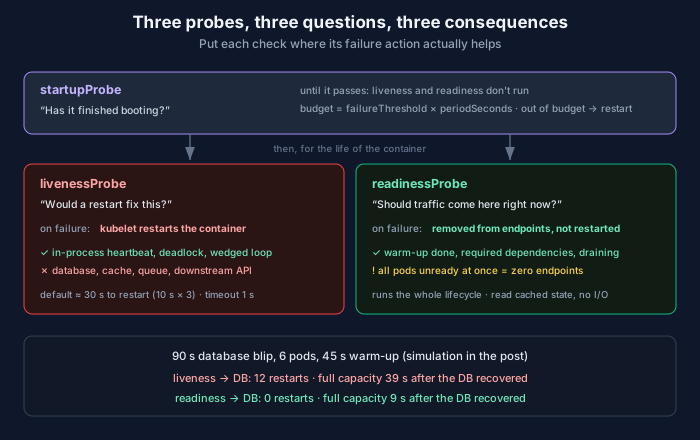
The classic way a Kubernetes probe causes an outage is a liveness probe that checks the database.
It looks responsible. The service can’t do anything useful without the database, so if the database is unreachable the service is unhealthy, so the probe should fail. Every step of that reasoning sounds fine. The conclusion restarts your entire fleet during a dependency blip, then makes you wait for every pod to warm back up after the database recovers.
The fix is knowing which question each probe is asking.
Three probes, three questions
The Kubernetes docs are clear about what happens on failure, and the consequences are the whole story.
Liveness: would a restart fix this? If a container fails its liveness probe more times than failureThreshold, the kubelet restarts it. The canonical example in the docs is a deadlock: the process is running but can’t make progress. That is a problem a restart actually solves.
Readiness: should traffic come here right now? A failed readiness probe restarts nothing. The kubelet sets the Pod’s Ready condition to false, and the EndpointSlice controller removes the Pod’s IP from every matching Service. Readiness runs for the container’s whole life, not just at boot, so a pod can go unready and come back as many times as it needs to.
Startup: has it finished booting? While a startup probe is configured and hasn’t yet succeeded, Kubernetes doesn’t run the other two. If it runs out of attempts, the container is killed and restarted.
Put the database check against those consequences. “The database is down” is a reason to stop sending a pod traffic (readiness). It’s never a reason to kill the process (liveness), because a fresh process will find the database exactly as down as the old one did.
The docs say it plainly, too: incorrect liveness probes “can lead to cascading failures,” and when you depend on back-end services, the liveness probe should pass when the app itself is healthy while the readiness probe checks the dependencies.
What it costs: a simulation
Here’s a toy model. Six pods, a 45-second warm-up (JIT, caches, connection pools), default probe timing, and a 90-second database outage. Design A has liveness checking the database. Design B has liveness checking only the process and readiness checking the database. Restarts get the kubelet’s exponential back-off: 10 seconds, then 20, then 40, capped at five minutes.
"""Six pods, one 90-second database blip, two probe designs.

A: the liveness probe checks the database.
B: liveness checks only the process; readiness checks the database.
"""
PODS, PERIOD, FAILURE_THRESHOLD = 6, 10, 3
WARMUP = 45                      # seconds from container start to serving
DB_DOWN = range(60, 150)         # the blip


def simulate(liveness_checks_db: bool, horizon: int = 300):
    started = [-WARMUP] * PODS   # every pod warm at t=0
    fails, backoff = [0] * PODS, [10] * PODS
    ready = [True] * PODS
    restarts, timeline = 0, []
    for t in range(horizon):
        db_up = t not in DB_DOWN
        for p in range(PODS):
            if t < started[p]:                   # waiting out restart back-off
                continue
            warm = t - started[p] >= WARMUP
            if (t + p) % PERIOD == 0:            # probes staggered per pod
                live_ok = db_up if liveness_checks_db else True
                fails[p] = 0 if live_ok else fails[p] + 1
                if fails[p] >= FAILURE_THRESHOLD:
                    # kubelet kills the container; the next start waits out
                    # an exponential back-off (10s, 20s, 40s ... capped at 5m)
                    started[p], fails[p] = t + backoff[p], 0
                    backoff[p] = min(backoff[p] * 2, 300)
                    restarts += 1
                    ready[p] = False
                    continue
                ready[p] = warm and db_up
        timeline.append(sum(1 for p in range(PODS)
                            if ready[p] and t - started[p] >= WARMUP and db_up))
    return timeline, restarts


for name, flag in [("A  liveness -> DB ", True), ("B  readiness -> DB", False)]:
    tl, restarts = simulate(flag)
    after = tl[DB_DOWN.stop:]
    back = next((i for i, s in enumerate(after) if s == PODS), None)
    print(f"{name}  restarts={restarts:2d}  full capacity {back:3d}s after the DB "
          f"recovered  lost pod-seconds after recovery={sum(PODS - s for s in after)}")
print()
print("serving pods, sampled every 15s from t=45:")
for name, flag in [("A", True), ("B", False)]:
    tl, _ = simulate(flag)
    print(f"  {name}  " + " ".join(f"{tl[i]}" for i in range(45, 300, 15)))
A liveness -> DB restarts=12 full capacity 39s after the DB recovered lost pod-seconds after recovery=215
B readiness -> DB restarts= 0 full capacity 9s after the DB recovered lost pod-seconds after recovery=35
serving pods, sampled every 15s from t=45:
A 6 0 0 0 0 0 0 0 0 1 6 6 6 6 6 6 6
B 6 0 0 0 0 0 0 1 6 6 6 6 6 6 6 6 6During the outage both designs serve nothing, which is honest: there’s no database. The difference is what happens after. Design B is back at full capacity within one probe period. Design A restarted every pod twice, and when the database came back it was still sitting through warm-up.
This model is kind to design A. It doesn’t include what happens in real life when six freshly started pods all open their connection pools against a database that has just recovered, or the cold caches sending every request to that same database at once. A recovering dependency is exactly the thing you don’t want to hit with a synchronized wave of cold starts.
The arithmetic you should know by heart
The defaults are periodSeconds: 10, timeoutSeconds: 1, failureThreshold: 3, successThreshold: 1, initialDelaySeconds: 0. Two numbers fall out of them.
Time to restart is about periodSeconds × failureThreshold. With defaults, 30 seconds of consecutive failures. If your service can legitimately stall for longer than that (a long GC pause, a big compaction), liveness will kill it mid-stall.
The one-second timeout is the default that bites hardest. A probe that takes 1.1 seconds is a failed probe. Under CPU pressure or a stop-the-world pause, a healthy process can miss that comfortably. I’d raise it to two or three seconds for liveness on anything that isn’t trivially fast, and keep the liveness handler itself as cheap as possible.
Startup budget is failureThreshold × periodSeconds on the startup probe. periodSeconds: 5 with failureThreshold: 24 gives a container two minutes to boot, and once it succeeds, liveness takes over with its normal tight timing. That’s why a startup probe beats a big initialDelaySeconds: the delay applies to every container for its whole life, while the startup probe only costs time when a container actually starts slowly.
What each endpoint should check
Here’s a minimal service with separate endpoints, standard library only.
import os, signal, threading, time
from http.server import ThreadingHTTPServer, BaseHTTPRequestHandler

state = {"heartbeat": time.monotonic(), "db_ok": True, "warm": False, "draining": False}


def work_loop():
    # Stand-in for the real event loop / consumer. If it deadlocks, the
    # heartbeat goes stale and liveness fails. That's the only thing
    # liveness should know about.
    state["heartbeat"] = time.monotonic()
    time.sleep(2)                        # pretend warm-up: caches, JIT, pools
    state["warm"] = True
    while True:
        state["heartbeat"] = time.monotonic()
        time.sleep(1)


class Probes(BaseHTTPRequestHandler):
    def do_GET(self):
        if self.path == "/livez":
            ok = time.monotonic() - state["heartbeat"] < 10
        elif self.path == "/readyz":
            ok = state["warm"] and state["db_ok"] and not state["draining"]
        else:
            self.send_error(404)
            return
        self.send_response(200 if ok else 503)
        self.end_headers()
        self.wfile.write(b"ok\n" if ok else b"not ok\n")

    def log_message(self, *args):
        pass


def on_sigterm(*_):
    state["draining"] = True             # fail readiness first, keep serving


if __name__ == "__main__":
    signal.signal(signal.SIGTERM, on_sigterm)
    server = ThreadingHTTPServer((os.environ.get("HOST", ""), 8080), Probes)
    threading.Thread(target=work_loop, daemon=True).start()
    server.serve_forever()
Polling it through warm-up, steady state, and a SIGTERM:
during warm-up   /livez  200
during warm-up   /readyz 503
warm             /livez  200
warm             /readyz 200
after SIGTERM    /livez  200
after SIGTERM    /readyz 503
A few choices in there are deliberate.
Liveness checks a heartbeat, not a dependency. The work loop stamps a timestamp; liveness fails only if the stamp goes stale. That catches the thing a restart fixes, a wedged loop, and nothing else.
I got this wrong in the first version of the snippet, which is instructive. I set the heartbeat only at import time and started the loop after the server bound its port. On a machine where binding was slow, the heartbeat was already stale by the time the loop began, and /livez returned 503 during warm-up. In a cluster without a startup probe, that’s a pod killed in the middle of booting. Stamp the heartbeat when the loop starts, and use a startup probe anyway.
Readiness reads state, it doesn’t do I/O. db_ok should be set by something in the background, such as the connection pool’s own health tracking, not by a query run inside the probe handler. A readiness probe that runs a query is a probe that fails whenever the database is slow, which is precisely when you don’t want extra load on it.
SIGTERM fails readiness first. When a pod is deleted, the SIGTERM and the removal from Service endpoints happen in parallel, not in sequence. For a few seconds, traffic can still arrive at a pod that’s shutting down. Failing readiness and continuing to serve for a short drain window means in-flight and late-arriving requests finish instead of hitting a closed socket.
Readiness has a failure mode too
Readiness isn’t free. If every pod’s readiness depends on the same shared thing, every pod goes unready together, the Service has zero endpoints, and clients get connection errors instead of your nicely formatted 503.
Sometimes that’s what you want. Often it isn’t. A pod that’s up but can’t reach its database could still serve cached reads, return a useful error, or shed load gracefully. Removing it from the endpoints takes all of those options off the table. Before you add a dependency to readiness, decide whether “this dependency is down” should mean “send no traffic here” or “serve degraded.” I went deeper on that distinction in the three states your health checks don’t have and on degraded modes in cascading failure.
The manifest
spec:
  terminationGracePeriodSeconds: 30
  containers:
    - name: api
      image: registry.example.com/api:1.8.2
      ports:
        - containerPort: 8080
      startupProbe:
        httpGet: { path: /livez, port: 8080 }
        periodSeconds: 5
        failureThreshold: 24      # up to 2 minutes to boot
      livenessProbe:
        httpGet: { path: /livez, port: 8080 }
        periodSeconds: 10
        timeoutSeconds: 3         # the default of 1s is too tight
        failureThreshold: 3
      readinessProbe:
        httpGet: { path: /readyz, port: 8080 }
        periodSeconds: 5
        timeoutSeconds: 2
        failureThreshold: 2
      lifecycle:
        preStop:
          sleep: { seconds: 5 }   # let endpoint removal propagate
The preStop sleep uses the built-in sleep action from recent Kubernetes versions. On older clusters the same effect needs an exec hook running sleep, which only works if your image actually has a sleep binary. Distroless images usually don’t.
If you serve gRPC, Kubernetes has native grpc probes that call the standard gRPC health-checking service, so you don’t need an HTTP sidecar endpoint just for probes.
A checklist for your manifests
- Does any liveness probe touch a database, cache, queue, or downstream API? Move that check to readiness, or delete it.
- Is
timeoutSecondsstill at the default of 1 on a liveness probe? Raise it. - Is there an
initialDelaySecondsover 30? Replace it with a startup probe. - Does the readiness handler do synchronous I/O? Make it read cached state.
- Does the app fail readiness on SIGTERM and keep serving through a drain window?
- If every pod went unready at once, would that be better or worse than serving degraded?
Liveness is the probe with a trigger on it. Give it the narrowest possible question, and it’ll only fire when firing helps.
Related: Load Balancing and Health Checks: The Three States Your Checks Don’t Have · The Reconciliation Loop: Why Kubernetes Self-Heals · Cascading Failure: Backpressure, Load Shedding, and Graceful Degradation
Comments