An agent with no memory re-derives the world on every turn. It re-reads the same runbook, re-discovers the same schema, re-introduces itself to the same user. An agent with the wrong memory does the opposite — it drowns in its own history, hauling ten thousand tokens of irrelevant chat log into every decision.
Both failures come from treating memory as one thing. It isn’t. Agentic memory is at least five distinct systems, each with a different cognitive role, a different storage substrate, a different eviction policy, and a different way of failing. Borrow the vocabulary from cognitive science — working, episodic, semantic, procedural — add the entity/profile layer that production systems always end up needing, and you have a framework for deciding what to remember where.
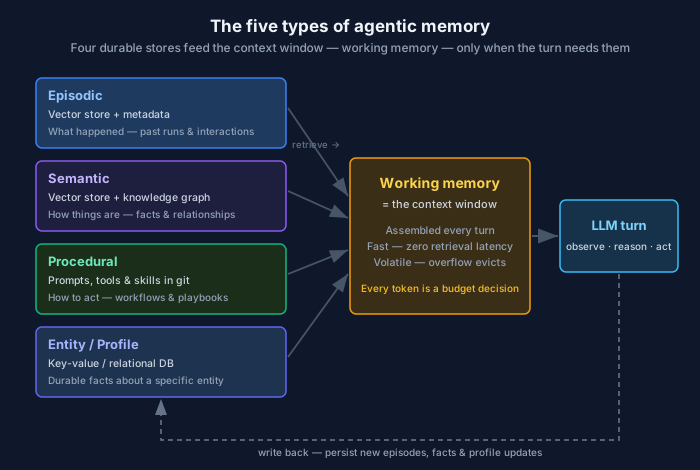
This post names the five types, maps each to the storage you’d actually reach for, and gives you a decision flowchart and a reference table to bookmark.
1. Working memory
What it is: The agent’s scratchpad for the task in front of it — the current goal, the last few tool results, the intermediate reasoning. In an LLM agent, working memory is the context window. Everything the model can “see” at inference time lives here, and nothing else does.
Storage substrate: The context window itself, assembled in-process on every turn. Backed by nothing more durable than the request you send to the model. If you don’t write it down somewhere else before the turn ends, it’s gone.
When to use it:
- The turn-by-turn state of an active task: plan, observations, partial results
- Anything the model needs right now to take the next action
- Short-lived reasoning you have no reason to persist
Tradeoffs:
- Fastest possible access — it’s already in the prompt, zero retrieval latency
- Strictly bounded and expensive. Every token is a budget decision, and the window fills faster than you expect (see Context engineering: the window is a budget, not a bucket)
- Volatile by definition. Working memory is where amnesia lives — when the turn ends or the window overflows, the oldest content is evicted whether you wanted it or not
# Working memory is just the message list you assemble each turn.
messages = [
    {"role": "system", "content": system_prompt},
    *retrieved_long_term_memory,   # pulled in from the stores below
    *recent_turns[-MAX_TURNS:],    # naive eviction: keep the last N turns
    {"role": "user", "content": current_input},
]
The mistake almost everyone makes first: treating working memory as if it were durable. It isn’t. The other four types exist precisely so you can move things out of the window and pull them back in only when they’re relevant.
2. Episodic memory
What it is: A record of what happened — past interactions, prior task runs, events the agent participated in. “Last Tuesday this user asked about the billing API and we resolved it by rotating their key.” Episodic memory is autobiographical: time-stamped, specific, and tied to a particular occurrence.
Storage substrate: Usually a vector store, so you can retrieve by semantic similarity (“find past episodes like the current situation”). Often paired with metadata filters (user ID, timestamp, outcome) so retrieval is both relevant and scoped.
When to use it:
- Multi-session continuity — the agent should remember conversations across days, not just within one window
- Few-shot grounding from real history: “here’s how we handled a similar incident before”
- Personalization that depends on the sequence of past interactions
Tradeoffs:
- Gives the agent continuity and the feel of “remembering you,” which is often the single biggest perceived-quality jump
- Retrieval quality is everything. Embed and chunk badly and you’ll surface irrelevant episodes that actively mislead the model
- Grows without bound. Episodic memory needs an eviction or summarization policy — roll old episodes into summaries, or you’ll pay to store and search noise forever
# Write an episode after each task; retrieve similar ones before the next.
store.upsert(
    id=run_id,
    embedding=embed(f"{user_input}\n{outcome_summary}"),
    metadata={"user_id": user_id, "ts": now(), "outcome": "resolved"},
)

similar = store.query(embed(current_input), top_k=3,
                      filter={"user_id": user_id})
3. Semantic memory
What it is: Knowledge about the world, decoupled from any specific event. Facts, definitions, relationships, domain rules. “The orders table joins to customers on customer_id.” “Region us-east-1 hosts the payments service.” Where episodic memory remembers that something happened, semantic memory knows how things are.
Storage substrate: Two complementary shapes. A vector store for unstructured knowledge you retrieve by similarity (docs, wiki pages, past postmortems). A knowledge graph for structured relationships you retrieve by traversal (service dependencies, schema joins, ownership). Mature systems use both — vector for “find me relevant text,” graph for “what is this connected to.”
When to use it:
- Grounding the agent in domain facts it shouldn’t have to infer (this is the heart of RAG — see What is retrieval-augmented generation?)
- Relationship-heavy reasoning where traversal beats similarity: dependency graphs, org charts, data lineage
- Anywhere you want the agent to know rather than guess. Packaging that knowledge in a structured, typed format is exactly what the Open Knowledge Format was built for
Tradeoffs:
- Dramatically reduces hallucination on factual questions when the knowledge is fresh and well-structured
- Staleness is the silent killer. Semantic memory that isn’t refreshed becomes confidently wrong — the worst failure mode for a fact store
- Graph and vector have different cost/complexity profiles. Don’t stand up Neo4j on day one if a vector store and good metadata get you 80% of the way
4. Procedural memory
What it is: How to do things — learned skills, workflows, and the patterns the agent applies rather than recalls. The reasoning strategy, the tool-use recipe, the “when you see X, do Y” playbook. In humans it’s riding a bike; in agents it’s the prompt scaffolding, the tool definitions, and increasingly the reusable skills an agent loads to perform a class of task.
Storage substrate: Prompts, system instructions, tool/function definitions, and skill files in version control. Less often a learned policy. The defining trait: it’s executed, not retrieved as a fact. It changes behavior, not just knowledge.
When to use it:
- Encoding repeatable workflows you want the agent to perform consistently (incident triage steps, a code-review rubric, a deployment checklist)
- Capturing hard-won operational know-how so it survives beyond one engineer’s head
- Constraining how the agent acts, not just what it knows
Tradeoffs:
- Makes agent behavior predictable and reviewable — procedural memory lives in git, so it’s diffable and auditable
- Versioning matters. A changed procedure changes behavior everywhere it’s loaded; treat it like code, because it is
- The line between “a long system prompt” and “procedural memory” is real: the latter is modular, named, and loaded on demand rather than stuffed permanently into the window
5. Entity / profile memory
What it is: Durable, structured facts about specific entities the agent deals with repeatedly — users, accounts, services, hosts. “This user prefers terse answers and is on the enterprise plan.” “This service has a 200ms p99 SLO and pages the platform team.” It’s the layer that makes an agent feel like it knows you, distinct from remembering specific past conversations.
Storage substrate: A key-value or relational store, keyed by entity ID. Structured fields, not free text — you want exact lookups (get_profile(user_id)), not similarity search. This is the one type where a boring database beats a vector store.
When to use it:
- Stable preferences and attributes that should apply to every interaction, not just similar ones
- System-of-record facts: entitlements, configuration, ownership, SLAs
- Personalization that must be exact and current, not approximate
Tradeoffs:
- Precise, cheap, and trivially auditable — it’s a row in a table
- Requires you to decide what’s worth a durable field versus what stays episodic. Over-model it and you’ve built a CRM by accident
- Update discipline matters: a stale profile fact (“user is on the free plan” after they upgraded) is worse than no fact at all
# Profile memory is exact lookup, not similarity search.
profile = db.get(user_id) or {}
context_block = render_profile(profile)   # injected into working memory each turn
The mapping table
| Type | Cognitive role | Storage substrate | Retrieval | Eviction policy | Volatility |
|---|---|---|---|---|---|
| Working | Current task state | Context window | None — it’s already loaded | Window overflow / end of turn | High (volatile) |
| Episodic | What happened | Vector store + metadata | Similarity + filter | Summarize/age out old episodes | Medium |
| Semantic | How things are | Vector store + knowledge graph | Similarity / graph traversal | Refresh on source change | Low (but goes stale) |
| Procedural | How to act | Prompts, tools, skills in git | Loaded by task type | Versioned, replaced not aged | Low |
| Entity/Profile | Facts about a specific entity | Key-value / relational DB | Exact key lookup | Updated in place | Low |
Decision flowchart
What are you trying to remember?

Is it only needed for the current task, right now?
├─ YES → Working memory (keep it in the window)
└─ NO  → Is it a fact about a specific user/service you'll look up by ID?
          ├─ YES → Entity/Profile memory (key-value / relational)
          └─ NO  → Is it a record of something that happened?
                    ├─ YES → Episodic memory (vector store + metadata)
                    └─ NO  → Is it world knowledge / facts / relationships?
                              ├─ YES → Semantic memory (vector + graph)
                              └─ NO  → Is it *how* to perform a task?
                                        └─ YES → Procedural memory (prompts/skills in git)
Real systems use all five at once. A support agent loads procedural memory to know its triage steps, looks up entity memory for the user’s plan, retrieves episodic memory for past tickets, pulls semantic memory for product facts, and assembles all of it into working memory for the turn. The art is routing each piece of information to the store that fits its shape — and pulling back only what the current step needs.
Four anti-patterns
Everything in the context window. The first instinct is to stuff history, facts, and instructions all into the prompt. It works in the demo and falls over the moment a real conversation runs long. Working memory is a cache, not a database.
A vector store as your database. Vector search is for similarity, not truth. Exact facts — a user’s plan, a service’s owner — belong in a key-value or relational store where lookups are exact and updates are atomic. Don’t embed a profile.
Never forgetting. Memory without an eviction or summarization policy doesn’t make the agent smarter — it makes retrieval noisier and bills larger. Episodic memory especially needs a plan for aging old episodes into summaries.
One store for all five. A single “memory” table or one giant vector index collapses five different access patterns into one, and you inherit the worst tradeoffs of each. The types are distinct because their storage needs are distinct.
Getting started: don’t build all five
You almost never need all five on day one, and building them up front is a classic case of solving problems you don’t have yet. Start simple and let the pain tell you what to add.
- Begin with working memory only. Everything in the window. Ship it. Most agents are fine here longer than you’d think.
- Add entity/profile memory first when you notice the agent forgetting durable facts it should know — a row in a table is the cheapest, highest-leverage memory you can add.
- Add episodic memory when users expect continuity across sessions — when “you helped me with this last week” needs to mean something.
- Add semantic memory when hallucination on domain facts becomes the bottleneck — that’s your cue for RAG, and eventually a graph.
- Extract procedural memory when the same workflow keeps drifting — pull it out of the prompt into a named, versioned skill.
Each addition is a two-way door. You can add a profile store this week and a graph next quarter without rebuilding. What you can’t easily undo is collapsing all five into one store on day one — so keep them separate even when you’ve only built one.
The window is a budget. Memory is how you spend less of it while remembering more.
Related posts:
Comments