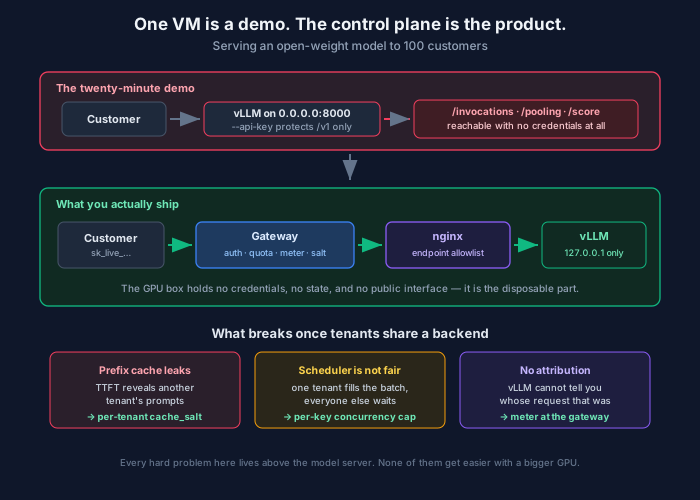
You can have an open-weight model answering HTTP requests in about twenty minutes. Rent a GPU box, pip install vllm, vllm serve, point an OpenAI SDK client at it, done. It works. The first time you do it there’s a genuinely great moment where a 120-billion-parameter model you fully control starts streaming tokens back at you and you think: that’s it? That’s the whole thing?
That’s not the whole thing. That’s the demo.
The gap between the demo and something you can put 100 paying customers on is not a model problem and mostly not even a GPU problem. It’s a control plane problem — keys, quotas, fairness, attribution, and the ability to cut off exactly one customer at 2am without restarting anything. Almost none of that lives in the model server, and the tutorials stop right before you get there.
This post is the whole path: the VM, the serving config, why the built-in API key flag is a trap, the auth design that replaces it, the multi-tenancy hazards nobody mentions, and the capacity math that tells you whether one GPU is generous or laughable for your particular hundred customers.
Start here: “100 customers” is not a number
Before any of the infrastructure, do this arithmetic, because it changes every decision downstream and it spans about four orders of magnitude.
A hundred customers doing occasional interactive chat — say 30 requests per customer per day — is 3,000 requests/day. Spread across eight business hours with a 3× peak factor, that’s a peak of roughly 0.3 requests per second. That is nothing. A single mid-size GPU is wildly over-provisioned for it, and your problem is going to be idle cost, not capacity.
A hundred customers each running an agent that makes eight LLM calls per task, 200 tasks a day, is 160,000 requests/day and a peak somewhere around 16 requests per second — with long contexts, because agent loops resend a growing transcript on every step. That’s a different cluster, a different budget, and a different architecture.
Same customer count. Fifty times the load, and considerably more than fifty times the cost, because the agent workload is also context-heavy.
So the unit that matters is peak concurrent requests and tokens per request, not customers. Get an estimate of both before you rent anything. If you genuinely don’t know — which is the common and honest answer pre-launch — assume interactive chat, buy for that, and instrument so you find out within the first month.
Part 1 — The VM
Sizing
The single question that determines your machine is whether the model’s weights fit in one GPU’s memory, because the moment they don’t you’re into tensor parallelism, multi-GPU interconnect, and a meaningfully harder operational story.
The sweet spot in 2026 for “serious but single-GPU” is a 100–120B-class mixture-of-experts model in a 4-bit native format. gpt-oss-120b is the cleanest worked example: Apache 2.0, natively MXFP4-quantized, and a 117B-parameter model that fits on one 80GB H100. Whatever you pick, the rule is the same — leave real headroom. If weights consume 60GB of 80GB, your remaining 20GB is the KV cache, and the KV cache is your concurrency. Fill the card with weights and you’ve bought a GPU that can serve one user at a time.
Rough shape of the box:
| Component | Spec | Why |
|---|---|---|
| GPU | 1× H100 80GB (or L40S 48GB for smaller models) | Weights + KV cache headroom |
| vCPU | 16+ | Tokenization and HTTP are CPU-bound at high RPS |
| RAM | 2× GPU memory minimum | Model load, page cache, CUDA graphs |
| Disk | 500GB NVMe | A 120B model is ~65GB; you’ll want two |
| OS | Ubuntu 24.04 LTS | Best driver and CUDA support story |
On price: H100 SXM sits around $2.99/GPU-hour on specialist clouds like RunPod Secure Cloud and roughly $3.99 on Lambda, versus about $6.88 on AWS p5 and higher still on Azure. The hyperscaler premium is real — 2× to 5× — and for a serving workload that doesn’t need to sit next to your other AWS infrastructure, it’s mostly premium you don’t get anything for. The counter-argument is compliance and data residency, which is a fine reason; just name it as the reason instead of pretending the pricing is competitive.
Provisioning
#!/usr/bin/env bash
# bootstrap-inference-vm.sh — Ubuntu 24.04 LTS, NVIDIA GPU
set -euo pipefail

# --- NVIDIA driver + CUDA toolkit ---
apt-get update
apt-get install -y --no-install-recommends \
    build-essential python3.12 python3.12-venv python3-pip \
    nvtop jq curl ca-certificates

# Ubuntu's packaged driver is fine and survives kernel upgrades cleanly.
apt-get install -y nvidia-driver-570-server nvidia-utils-570-server

# --- Dedicated, unprivileged service account ---
useradd --system --create-home --home-dir /opt/inference --shell /usr/sbin/nologin inference

# --- Model cache on the NVMe, not the root volume ---
install -d -o inference -g inference /opt/inference/models

# --- vLLM in an isolated venv ---
sudo -u inference python3.12 -m venv /opt/inference/venv
sudo -u inference /opt/inference/venv/bin/pip install --upgrade pip
sudo -u inference /opt/inference/venv/bin/pip install vllm huggingface_hub

echo "Reboot to load the driver, then verify with: nvidia-smi"
Reboot, run nvidia-smi, confirm the GPU appears with the expected memory. If it doesn’t, stop and fix that now — every downstream failure will be more confusing than this one.
Pre-download the weights rather than letting the first request block on a 65GB pull:
sudo -u inference HF_HOME=/opt/inference/models \
  /opt/inference/venv/bin/hf download openai/gpt-oss-120b
Part 2 — Serving
The flags that actually matter
Most vLLM tuning guides list forty arguments. Five of them determine whether your deployment works.
# /etc/systemd/system/vllm.service
[Unit]
Description=vLLM inference server
After=network-online.target
Wants=network-online.target

[Service]
Type=simple
User=inference
Group=inference
Environment=HF_HOME=/opt/inference/models
Environment=VLLM_API_KEY=%I
ExecStart=/opt/inference/venv/bin/vllm serve openai/gpt-oss-120b \
    --host 127.0.0.1 \
    --port 8000 \
    --served-model-name default \
    --max-model-len 32768 \
    --gpu-memory-utilization 0.92 \
    --max-num-seqs 64 \
    --enable-request-id-headers
Restart=always
RestartSec=10
# Model load on a cold page cache is slow; don't let systemd kill it mid-load.
TimeoutStartSec=900

[Install]
WantedBy=multi-user.target
Taking those in order of how much trouble they save you:
--host 127.0.0.1 is the most important line in the file. The model server should never be reachable from outside the box. Everything external goes through the proxy. I’ll come back to why in a moment, and it’s a better reason than “defense in depth.”
--max-model-len 32768 caps context length. This is a capacity decision disguised as a capability decision: KV cache consumption scales with context, so allowing 128K context means a handful of long-context requests can consume the entire cache and stall everyone else. Set it to what your product actually needs, not what the model supports.
--gpu-memory-utilization 0.92 is the fraction of VRAM vLLM may claim. Higher means more KV cache, means more concurrency. Going above ~0.95 tends to produce OOM crashes under load spikes rather than graceful degradation, which is a bad trade.
--max-num-seqs 64 is the cap on sequences in a batch (the default is 128). This is your primary latency-versus-throughput dial. Larger batches serve more total tokens per second but every individual request waits longer. Tune it against your p95 target, empirically, under a load pattern that resembles production.
Prefix caching you don’t need to enable — on the V1 engine it’s on by default, and the flag you’re more likely to reach for is --no-enable-prefix-caching to turn it off. Leave it on. It’s the closest thing to free throughput in the stack, especially for chat and agent workloads that resend a shared prefix on every turn. It does have a multi-tenant security wrinkle, which gets its own section below.
Notably absent from that unit file: --api-key is not doing security work here. It’s set (via VLLM_API_KEY) as a belt-and-braces measure in case the bind address is ever misconfigured, but it is not the authentication story. Here’s why.
The --api-key trap
vLLM’s --api-key flag looks like authentication. It is not, in two separate ways.
The obvious problem is that it’s a single shared static string. Every customer gets the same one. You cannot attribute a request to a customer, meter usage, apply a per-customer quota, or revoke one customer without rotating the secret for all hundred of them and coordinating a hundred client-side updates.
The non-obvious problem is worse, and it comes straight from vLLM’s own security documentation: the flag only protects endpoints under the /v1 path prefix. Other endpoints on the same HTTP server are exposed without any authentication enforcement. The docs are explicit that an attacker can
“Bypass authentication by using non-
/v1endpoints like/invocations,/inference/v1/generate,/generative_scoring,/pooling,/classify,/score, or/rerankto run arbitrary inference without credentials.”
So a vLLM server bound to 0.0.0.0 with --api-key set is an open inference endpoint wearing a hat. vLLM’s own recommendation is to deploy behind a reverse proxy that “explicitly allowlists only the endpoints you want to expose.”
Which is the actual reason for --host 127.0.0.1: not layered paranoia, but that the built-in auth has a documented bypass and the proxy is the only thing that closes it.
The allowlist proxy
Deny by default, permit three paths:
# /etc/nginx/sites-available/inference
upstream vllm { server 127.0.0.1:8000; }

server {
    listen 127.0.0.1:8080;

    # Default deny — this is the point of the whole file.
    location / { return 404; }

    location = /v1/chat/completions { proxy_pass http://vllm; include /etc/nginx/snippets/inference-proxy.conf; }
    location = /v1/completions      { proxy_pass http://vllm; include /etc/nginx/snippets/inference-proxy.conf; }
    location = /v1/models           { proxy_pass http://vllm; include /etc/nginx/snippets/inference-proxy.conf; }

    # Metrics: scraper subnet only, never the public path.
    location = /metrics {
        allow 10.0.0.0/8;
        deny all;
        proxy_pass http://vllm;
    }
}
# /etc/nginx/snippets/inference-proxy.conf
proxy_http_version 1.1;
proxy_set_header Connection "";
proxy_buffering off; # Required for token streaming (SSE)
proxy_read_timeout 600s; # Long generations are not hung connections
proxy_set_header X-Request-ID $request_id;proxy_buffering off is the one people miss. Leave buffering on and streaming responses arrive in a single clump at the end, which looks exactly like the model being slow and sends you debugging in entirely the wrong direction.
Part 3 — The API key you actually ship
Now the part that turns inference into a product.
Key design
A customer-facing API key needs four properties, and the standard shape satisfies all of them:
sk_live_7f3a2b91c4e8d6a5b0f2e9c7d4a1b8e3
└─┬─┘ └┬─┘ └──────────────┬───────────────┘
  │    │                  └─ 32 hex chars from a CSPRNG (128 bits)
  │    └─ environment: live | test
  └─ fixed prefix, so secret scanners can find it in a leaked repo
The prefix is not cosmetic. GitHub’s secret scanning, TruffleHog, and every enterprise DLP product match on known key prefixes. A key that looks like generic base64 is a key nobody will ever alert you about when a customer commits it.
Store the hash, never the key. SHA-256 is correct here — this is a high-entropy random token, not a user-chosen password, so bcrypt/argon2 buy you nothing and cost you a hash on every single request. Keep a short display prefix so customers can identify keys in a dashboard, and a last_used_at so you can find abandoned ones.
CREATE TABLE api_keys (
    id            BIGSERIAL PRIMARY KEY,
    tenant_id     UUID        NOT NULL REFERENCES tenants(id),
    key_hash      BYTEA       NOT NULL UNIQUE,   -- sha256(full_key)
    key_prefix    TEXT        NOT NULL,          -- 'sk_live_7f3a2b91' for display
    name          TEXT        NOT NULL,
    created_at    TIMESTAMPTZ NOT NULL DEFAULT now(),
    last_used_at  TIMESTAMPTZ,
    expires_at    TIMESTAMPTZ,
    revoked_at    TIMESTAMPTZ
);
CREATE INDEX ON api_keys (key_hash) WHERE revoked_at IS NULL;
import hashlib
import secrets
KEY_PREFIX_LEN = 16 # 'sk_live_' + first 8 hex chars
def issue_key(env: str = "live") -> tuple[str, bytes, str]:
"""Return (full_key, key_hash, display_prefix).
The full key is returned exactly once, to the caller, and never stored.
"""
token = secrets.token_hex(16) # 128 bits
full_key = f"sk_{env}_{token}"
key_hash = hashlib.sha256(full_key.encode()).digest()
return full_key, key_hash, full_key[:KEY_PREFIX_LEN]
def verify_key(full_key: str, conn) -> dict | None:
"""Constant-time lookup by hash. Returns the tenant row or None."""
key_hash = hashlib.sha256(full_key.encode()).digest()
return conn.fetchrow(
"""
SELECT k.tenant_id, k.id AS key_id, t.plan, t.monthly_token_budget
FROM api_keys k JOIN tenants t ON t.id = k.tenant_id
WHERE k.key_hash = $1
AND k.revoked_at IS NULL
AND (k.expires_at IS NULL OR k.expires_at > now())
""",
key_hash,
)Looking up by hash rather than iterating and comparing gives you constant-time verification for free — the index does the work, and there’s no string comparison against a stored secret to time.
Buy or build the gateway
You now need something that sits in front of vLLM and, per request: authenticates the key, resolves the tenant, checks quota and rate limits, forwards upstream, meters the tokens, and writes a usage record.
That is roughly 400 lines of well-understood code, and it is also exactly what LiteLLM does out of the box. Unless you have a specific reason to own it, use LiteLLM and spend your engineering time on the product. Virtual keys, per-key budgets, rate limits, model allowlists, and spend tracking are all config:
# litellm-config.yaml
model_list:
  - model_name: default
    litellm_params:
      model: hosted_vllm/default
      api_base: http://10.0.1.10:8080     # the nginx allowlist, not vLLM directly
      api_key: os.environ/VLLM_API_KEY

general_settings:
  master_key: os.environ/LITELLM_MASTER_KEY
  database_url: os.environ/DATABASE_URL   # Postgres: keys, budgets, spend
  alerting: ["slack"]

litellm_settings:
  set_verbose: false
  drop_params: true
  success_callback: ["postgres"]
  cache: true
  cache_params:
    type: redis
    host: os.environ/REDIS_HOST
Then a customer key is one API call, with its own budget and ceilings:
curl -sX POST https://api.example.com/key/generate \
  -H "Authorization: Bearer $LITELLM_MASTER_KEY" \
  -H "Content-Type: application/json" \
  -d '{
        "key_alias": "acme-corp-prod",
        "models": ["default"],
        "max_budget": 200,
        "budget_duration": "30d",
        "rpm_limit": 60,
        "tpm_limit": 120000,
        "metadata": {"tenant_id": "acme-corp", "plan": "growth"}
      }'
LiteLLM needs Postgres for keys, budgets and spend, and Redis for rate-limit state. Both go on the gateway VM, not the GPU box — you want to be able to reboot, resize, or replace the GPU without touching the system of record for customer credentials.
The architecture that results:
Customer → TLS termination → LiteLLM gateway (auth, quota, metering)
                                    ↓
                             nginx allowlist (endpoint deny-by-default)
                                    ↓
                             vLLM on 127.0.0.1 (no auth surface at all)
The GPU VM has no public interface, no customer credentials, and no state worth backing up. That property is worth more than it sounds like: it makes the expensive, fragile, frequently-restarted component of your system the disposable one.
Part 4 — Three multi-tenancy problems nobody warns you about
The demo-to-product gap has some sharp edges that only appear once tenants share a backend.
Prefix caching leaks across tenants
Prefix caching reuses KV blocks between requests that share a prompt prefix. A cache hit is dramatically faster to first token than a miss. Those two facts together are a timing side channel: an attacker sharing your backend can submit a candidate prompt, measure TTFT, and learn whether someone else has already sent it.
This isn’t hypothetical — vLLM carries it as a security advisory (GHSA-4qjh-9fv9-r85r), and the mitigation shipped in PR #17045 as an optional cache_salt field on the request. The salt is mixed into the hash of the first block, so only requests carrying the same salt can share cached blocks.
In a multi-tenant deployment the gateway should inject a per-tenant salt on every request:
payload["cache_salt"] = tenant_id # or HMAC(server_secret, tenant_id)That keeps cache reuse within a customer, which is where nearly all of the value is anyway — shared system prompts and multi-turn conversations are per-tenant by nature — while isolating it between customers. You give up almost no hit rate and close the channel. If your customers are enterprises with confidentiality expectations, this is a question you will eventually be asked in a security review, and “we salt the prefix cache per tenant” is a much better answer than working it out live.
The scheduler is not fair
vLLM’s scheduler optimizes aggregate throughput. It has no concept of tenants. One customer submitting 200-page documents will fill the batch and monopolize the KV cache, and every other customer’s p95 degrades — while every GPU dashboard shows a perfectly healthy, fully utilized card.
You cannot fix this in vLLM. You fix it at the gateway with admission control:
- Per-key concurrency limit. A customer may have N requests in flight; the N+1th gets queued or a 429. This is the single highest-value control and most teams don’t have it.
- Per-request token ceiling. Cap
max_tokensand reject oversized prompts before they reach the scheduler. - A separate pool for batch work. If you offer async/bulk processing, it must not share a queue with interactive traffic. Different SLO, different pool.
You cannot explain the bill
vLLM has no idea which customer sent a request. If usage metering lives only in vLLM’s metrics, you can tell your customers what the cluster did, and nothing about what they did.
Every request needs a usage record written at the gateway — tenant, key, model, prompt tokens, completion tokens, cached tokens, latency, status. Write it on the response path, including for failures. The first time a customer disputes an invoice, this table is the entire conversation, and you cannot backfill it.
Also: meter cached prompt tokens separately from uncached ones. If you ever want to pass prefix-cache savings on as a discount — which is a genuinely good commercial lever, since it rewards customers for the stable-prefix behavior that makes your cluster cheaper to run — you need the data from day one.
Part 5 — The capacity and cost math
Here’s the arithmetic for the worked example, so you can substitute your own numbers.
"""Capacity and unit cost for a single-GPU open-weight deployment."""
from dataclasses import dataclass


@dataclass
class Deployment:
    gpu_hourly: float = 2.99          # H100 SXM, specialist cloud
    gpu_count: int = 2                # 1 serving + 1 for HA
    peak_output_tok_s: float = 1000.0 # measured at max batch, offline
    slo_derate: float = 0.60          # sustainable at your p95 TTFT target
    tokens_per_response: int = 400
    active_hours_per_day: int = 8
    peak_to_average: float = 3.0      # peak rate ÷ mean rate
    support_cost_month: float = 200.0 # gateway VM, Postgres, Redis, egress

    @property
    def serving_gpus(self) -> int:
        return max(1, self.gpu_count - 1)   # the HA replica adds no capacity

    def peak_rps(self) -> float:
        usable = self.peak_output_tok_s * self.slo_derate * self.serving_gpus
        return usable / self.tokens_per_response

    def responses_per_day(self) -> float:
        mean_rps = self.peak_rps() / self.peak_to_average
        return mean_rps * self.active_hours_per_day * 3600

    def monthly_cost(self) -> float:
        return self.gpu_hourly * self.gpu_count * 730 + self.support_cost_month

    def cost_per_million_output_tokens(self) -> float:
        monthly_tokens = self.responses_per_day() * self.tokens_per_response * 30
        return self.monthly_cost() / (monthly_tokens / 1_000_000)


if __name__ == "__main__":
    d = Deployment()
    customers = 100
    print(f"Peak capacity:            {d.peak_rps():>10,.1f} req/s")
    print(f"Responses/day:            {d.responses_per_day():>10,.0f}")
    print(f"  ...per customer:        {d.responses_per_day()/customers:>10,.0f}")
    print(f"Monthly infra cost:       ${d.monthly_cost():>9,.0f}")
    print(f"  ...per customer:        ${d.monthly_cost()/customers:>9,.2f}")
    print(f"Effective $/1M out tokens:${d.cost_per_million_output_tokens():>9,.2f}")
Running the defaults: about 1.5 requests/second peak, roughly 14,400 responses/day — 144 per customer per day across a hundred of them — at $4,565/month, or about $46 per customer per month in infrastructure alone, before you’ve paid anyone to operate it.
Two things in that output deserve attention.
The HA replica doubles your cost and adds zero capacity. At 100 customers on one GPU, a single VM is a single point of failure with a multi-minute recovery time, because the model has to load from disk before it can serve. If your customers are consumers experimenting, run one and accept the risk. If they’re businesses with a contract, you’re buying the second GPU, and your price floor is set by that replica rather than by your traffic. This is the specific reason self-hosting economics look terrible at small scale and fine at large scale — the fixed cost of redundancy amortizes.
The effective cost per million output tokens is about $26 at that duty cycle, which is worse than most hosted API rates for comparable models. That is not an argument against self-hosting. It is an argument against justifying self-hosting on cost at low volume. The real reasons — data residency, model control, no per-token vendor exposure, a latency floor you own — are good reasons. Lead with those. I’ve written about why the utilization number hides all of this, and the short version is that duty cycle dominates everything and almost nobody puts it in the business case.
Re-run that script with gpu_count=1 and peak_to_average=1.2 and watch the unit cost fall by a factor of five. That’s the whole game: redundancy and burstiness, not GPU price.
Part 6 — Scaling past one box, in order
When the single GPU stops being enough, add things in this sequence. Most teams start at step 5 and skip 1 through 4, which is expensive.
1. Fix batching and context limits. Graph vllm:num_requests_running under peak load. If it’s consistently in low single digits while requests queue, you have a configuration problem, not a capacity problem. Raise --max-num-seqs, lower --max-model-len, and re-measure before spending anything.
2. Route cheap requests to a cheaper model. A meaningful share of production traffic — classification, extraction, short summarization, routing decisions — doesn’t need your largest model. Standing up a 7B model alongside the 120B on the same box, or on a much cheaper L40S, and routing to it deliberately is usually the single largest capacity win available. This is the SLM tier idea, and the important part is that model choice becomes a platform decision with an eval gate, not something each caller picks.
3. Add replicas behind the gateway. LiteLLM will load-balance across multiple api_base entries. This is where horizontal scaling actually starts, and it’s straightforward.
4. Make the load balancing model-aware. Once you have several replicas, round-robin becomes actively harmful — it ignores KV cache locality, so a request whose prefix is already cached on replica A gets sent to replica B and pays full prefill again. This is what the Gateway API Inference Extension exists to fix, and round-robin for LLM traffic is malpractice once you’re past two replicas.
5. Move to Kubernetes. Only when you have enough replicas that manual management genuinely hurts. The overhead is real and it buys you nothing at three replicas.
The recurring theme: the first four steps are configuration and routing, and they’re where the multiples are. Step 5 is where the complexity is.
What to watch
Four signals tell you nearly everything. Keep them on one dashboard.
| Signal | Metric | Threshold |
|---|---|---|
| Are we saturated? | vllm:num_requests_waiting | > 0 sustained for 5m |
| Is the cache working? | vllm:prefix_cache_hits ÷ vllm:prefix_cache_queries | < 0.3 for a stable-prefix workload |
| Are we meeting the SLO? | p95 vllm:time_to_first_token_seconds | > your published target |
| Is anyone about to be surprised? | Per-tenant spend vs. budget | > 80% of monthly budget |
The two most useful ones are the least obvious. num_requests_waiting above zero means you have a queue, and a queue means latency the GPU dashboard will never show you. And the per-tenant budget alert is a support metric masquerading as an ops metric — a customer hitting a hard quota with no warning generates an angry ticket; the same customer warned at 80% generates an upgrade conversation.
Note that prefix cache hit rate is two counters on the V1 engine, not a gauge — the old gpu_prefix_cache_hit_rate_perc gauge is deprecated. Take the ratio yourself in PromQL.
The part worth remembering
The twenty-minute demo is real, and it’s genuinely one of the better things about this era of infrastructure. A 120B-parameter model on a machine you control, answering requests, no vendor in the path — that was a research-lab capability three years ago.
But the demo and the product differ by a control plane, and the control plane is where all the actual engineering is. Every hard problem in this post — key issuance and revocation, per-tenant quotas, admission control for fairness, usage attribution, cache isolation between tenants — lives above the model server, and none of it gets easier by picking a better model or a bigger GPU.
Which is, I think, the reframe that matters. Serving an open-weight model to customers is not an ML problem that happens to need some infrastructure. It’s a multi-tenant platform problem that happens to have a model in it. Staff it that way and the thing works. Staff it as a model deployment and you will ship a demo with a login page and find out the difference from your customers.
Start with the capacity arithmetic. Bind vLLM to localhost. Put a real gateway in front of it. The rest is the same platform engineering you already know how to do.
Related: GPU utilization is a lying metric · Round-robin is malpractice for LLM traffic · Most of your AI platform’s traffic doesn’t need a frontier model · No anonymous inference endpoints
Sources: vLLM Security documentation · vLLM OpenAI-Compatible Server · vLLM prefix-caching timing side-channel advisory GHSA-4qjh-9fv9-r85r · vLLM PR #17045 — cache salting · vLLM Metrics design · LiteLLM multi-tenant architecture · LiteLLM budgets and rate limits · openai/gpt-oss-120b model card · H100 rental price comparison
Comments