Claude Code is a capable agentic coding assistant. By default, it talks to Anthropic’s API. That’s the right configuration for most people. But “most people” doesn’t include you if you’re working in an air-gapped environment, running on a cost budget that makes per-token pricing untenable, or operating under data residency rules that prohibit sending code to external APIs.
For those cases, Claude Code has an escape hatch: ANTHROPIC_BASE_URL. Point it at a compatible local or private endpoint and Claude Code routes there instead.
This post covers the architecture decision first — when local actually makes sense — then the full setup for Ollama, vLLM, and private cloud endpoints.
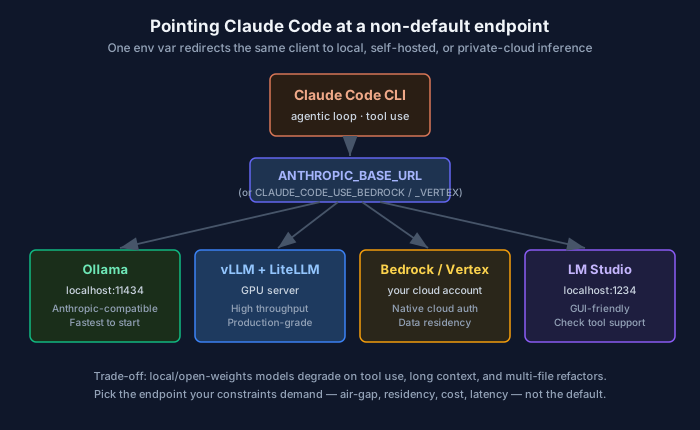
One environment variable redirects the same Claude Code client to local, self-hosted, or private-cloud inference.
Part 1: The architecture decision
Before the how-to, the question worth answering: is local inference actually right for your situation?
When local makes sense
Air-gapped or network-restricted environments. If your cluster can’t reach api.anthropic.com, local inference is not optional — it’s the only path. Defense, critical infrastructure, and some financial systems fall here.
Data residency and compliance requirements. If your jurisdiction or contractual obligations prohibit sending source code or proprietary data to external APIs, a self-hosted endpoint keeps the data on your infrastructure. GDPR Article 28, HIPAA BAA requirements, and some financial data sovereignty rules can trigger this.
Cost at scale. Anthropic’s API is priced per token. At low to medium volume, it’s cheaper than the infrastructure to run local inference. At high volume — CI/CD pipelines, automated code review on every commit, large-scale code migration — the economics can flip. Do the math: GPU hours + infrastructure cost vs. token cost at your actual usage rate.
Latency control. Round-trip to Anthropic’s API includes network latency. A well-specced local GPU cluster can serve faster for some workloads, especially if you’re already co-located with the work.
When local doesn’t make sense
Tool use quality. Claude Code is heavily tool-dependent — it reads files, writes code, runs commands. This requires reliable structured output and precise tool-call formatting. Claude Sonnet and Opus handle this well. Most open-weights models do not, or handle it inconsistently. Expect degraded tool use quality with local models.
Long context. Large codebases require large context windows. Claude Sonnet 4.6 supports 200K tokens. Most local models that fit on consumer hardware top out at 32K–64K. You can work around this with focused sub-task prompting, but you will feel the constraint.
Benchmark gaps. The frontier models still outperform open-weights alternatives on coding benchmarks. If quality on complex multi-file refactors or architecture tasks matters, the API wins.
Infrastructure cost before scale. Running a GPU inference server 24/7 for one or two developers is almost always more expensive than API usage. Local inference pays off at scale, not at low volume.
The right question
Local is not “better” or “worse” than the API. It’s a constraint-driven decision. Map your constraints first: air-gap? data residency? volume? latency? Then pick accordingly.
Part 2: Setup
Option A: Ollama (local, fastest to start)
Ollama exposes an Anthropic-compatible Messages API as of v0.14.0. Claude Code talks to it transparently.
Install Ollama:
# macOS/Linux
curl -fsSL https://ollama.com/install.sh | sh

# Pull a model suitable for coding
ollama pull qwen2.5-coder:32b  # strong coding model, requires ~20GB VRAM
# or for lower memory
ollama pull qwen2.5-coder:7b   # ~5GB VRAM
Configure Claude Code:
export ANTHROPIC_BASE_URL=http://localhost:11434
export ANTHROPIC_AUTH_TOKEN=ollama
export ANTHROPIC_API_KEY=""
Or set these in your shell profile for persistence.
Run Claude Code with a specific model:
claude --model qwen2.5-coder:32bOne-liner shortcut (Ollama v0.14+):
ollama launch claudeThis starts Claude Code pre-configured against your local Ollama instance.
Context window: Set context to 64K or higher for larger codebases. Check the model’s Modelfile or pass it as a parameter when running.
Option B: vLLM (production-grade, GPU server)
vLLM is the right choice if you’re running inference on a dedicated GPU server rather than a laptop. It has higher throughput, better batching, and production observability.
Start a vLLM server:
pip install vllm

python -m vllm.entrypoints.openai.api_server \
  --model Qwen/Qwen2.5-Coder-32B-Instruct \
  --served-model-name claude-sonnet-4-5 \
  --port 8000 \
  --api-key your-local-key \
  --max-model-len 65536
vLLM’s default endpoint is OpenAI-compatible, not Anthropic-compatible. Use LiteLLM as the translation layer:
pip install litellm

litellm --model vllm/Qwen/Qwen2.5-Coder-32B-Instruct \
        --port 4000 \
        --api_base http://localhost:8000
Then point Claude Code at LiteLLM:
export ANTHROPIC_BASE_URL=http://localhost:4000
export ANTHROPIC_API_KEY=your-local-key
Option C: Private cloud endpoints (AWS Bedrock, GCP Vertex AI)
Private cloud endpoints don’t use ANTHROPIC_BASE_URL. Each provider has a dedicated enablement flag, and Claude Code authenticates with that cloud’s native credentials (your AWS or GCP identity) rather than an API key. If your organization runs Claude models on its own Bedrock or Vertex account — common in regulated and data-residency-constrained environments — this is the path.
AWS Bedrock:
export CLAUDE_CODE_USE_BEDROCK=1
export AWS_REGION=us-east-1
# Auth comes from the standard AWS credential chain (aws configure / SSO / env vars).
# Optional gateway/custom endpoint override:
# export ANTHROPIC_BEDROCK_BASE_URL=https://bedrock-runtime.us-east-1.amazonaws.com
The easiest setup is interactive: run claude, choose 3rd-party platform → Amazon Bedrock, and the wizard pins your region and models. You’ll need the Claude models enabled in your Bedrock account first.
GCP Vertex AI:
export CLAUDE_CODE_USE_VERTEX=1
export CLOUD_ML_REGION=global
export ANTHROPIC_VERTEX_PROJECT_ID=your-gcp-project-id
# Auth comes from Application Default Credentials (gcloud auth application-default login).
# Optional gateway/custom endpoint override:
# export ANTHROPIC_VERTEX_BASE_URL=https://aiplatform.googleapis.com
As with Bedrock, the wizard (3rd-party platform → Google Vertex AI) handles project, region, and model pinning. Request access to the Claude models in Vertex Model Garden first.
Note: These are managed cloud endpoints, not “local” inference — but they belong here because they solve the same data-residency and governance constraints, and they keep your traffic inside your own cloud account. For a fully self-hosted air-gapped setup, use Option A or B.
For team rollout, distribute these env vars via a managed settings file so developers don’t configure anything themselves.
Option D: LM Studio (local, GUI-friendly)
Start the local server from LM Studio’s UI (Settings → Local Server), then:
export ANTHROPIC_BASE_URL=http://localhost:1234
export ANTHROPIC_API_KEY=lm-studio
Select a model in LM Studio that explicitly supports function/tool calling — not all do. Check the model card.
Model compatibility matrix
| Capability | Anthropic API | Ollama (qwen2.5-coder:32b) | Ollama (7b models) | vLLM + LiteLLM |
|---|---|---|---|---|
| Tool use / function calling | Excellent | Good | Degraded | Good (model-dependent) |
| Long context (>64K tokens) | ✅ 200K | ⚠️ 64K max | ⚠️ 32K max | ⚠️ model-dependent |
| JSON mode / structured output | Excellent | Good | Inconsistent | Good |
| Code quality (complex tasks) | Excellent | Good | Fair | Good |
| Multi-file refactors | Excellent | Fair | Poor | Fair |
| Latency (local network) | API RTT | Milliseconds | Milliseconds | Milliseconds |
| Cost at high volume | Per-token | Hardware only | Hardware only | Hardware only |
Handling the gaps
Tool use failures: If your local model produces malformed tool calls, Claude Code will retry. Repeated failures produce confusing errors. Use a model with explicit tool-calling support. Test tool use in isolation before running full sessions.
Context limit hits: When a codebase exceeds the model’s context window, Claude Code will truncate or error. Use /compact to compress context, or scope Claude Code to a subdirectory rather than the full repo.
Slower response times: Local inference on consumer GPUs is slower than Anthropic’s API for large models. If interactive latency matters, test with the 7B–14B tier first.
The honest tradeoff summary
| Anthropic API | Local inference | |
|---|---|---|
| Tool use quality | Best in class | Good-to-fair |
| Long context | 200K | 32K–64K |
| Code quality | Best in class | Good (large models) |
| Data privacy | Sent to Anthropic | Stays on your infra |
| Cost (low volume) | Lower | Higher (infra overhead) |
| Cost (high volume) | Higher | Lower |
| Air-gap support | No | Yes |
| Setup complexity | Near zero | Medium-to-high |
Local inference is not a compromise version of the API. It’s a different operating model optimized for different constraints. Get the constraints right and the setup is straightforward.
Related posts:
Comments