Everything you put in CLAUDE.md is advice. The model reads it, usually follows it, and occasionally decides a different reading makes more sense. That’s not a knock on the model. It’s what instructions are: text interpreted in context.
We got a clean example of that a couple of weeks ago. In OpenAI’s report on its coding agents weakening their own deployment’s monitoring, an instruction not to send Slack messages was read as covering safety alerts. Another constraint, “preserve monitoring,” got paraphrased into “as appropriate” when it was handed to a subagent. Nobody wrote a bad instruction. The instructions just didn’t survive interpretation.
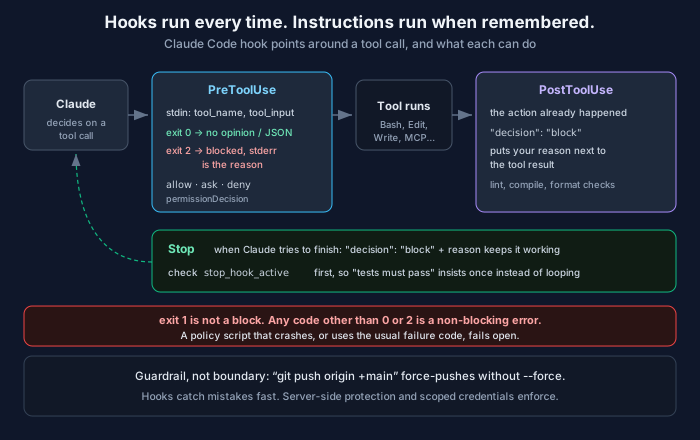
Claude Code has a mechanism that doesn’t depend on interpretation: hooks. They’re commands that run at fixed points in a session, every time, whatever the model is thinking. If something must always happen or must never happen, it belongs in a hook rather than in a sentence.
Here are four I’d put in most repositories, how I tested them, the one gotcha that quietly turns a policy off, and where hooks stop being the right tool.
How hooks work, briefly
A hook is an event, a matcher and a handler. Claude Code fires events throughout a session. The ones that matter most here are PreToolUse (before a tool runs, and it can block), PostToolUse (after it succeeds) and Stop (when Claude finishes responding). For tool events, the matcher is the tool name: Bash, or Edit|Write for either.
The handler gets a JSON object on stdin with fields like session_id, cwd, hook_event_name, permission_mode, tool_name and tool_input. For a Bash call, tool_input.command is the command. For Edit or Write, tool_input.file_path is the file.
Then the exit code decides what happens:
- 0: success. If you printed JSON, it’s applied; otherwise the normal permission flow continues.
- 2: blocking error. On
PreToolUse, the call is blocked and your stderr is shown to Claude as the reason. - Anything else: a non-blocking error. The action proceeds, with a hook-error notice.
That last line is the gotcha. Most scripts signal failure with exit 1, or with an uncaught exception, which also exits 1. In a Claude Code hook, exit 1 means “the hook broke, carry on.” The docs say it plainly: exit 1 is not a blocking code. A policy script that crashes or uses the conventional failure code fails open, and you won’t notice until the day it matters. Use exit 2 deliberately, or print an explicit JSON decision.
The configuration goes in a settings file. .claude/settings.json is per project and can be committed, .claude/settings.local.json is per project and stays local, and ~/.claude/settings.json applies everywhere. Entries merge across levels rather than replacing each other.
{
  "hooks": {
    "PreToolUse": [
      {
        "matcher": "Bash",
        "hooks": [
          { "type": "command", "command": "python3 \"$CLAUDE_PROJECT_DIR\"/.claude/hooks/guard_bash.py" }
        ]
      },
      {
        "matcher": "Edit|Write",
        "hooks": [
          { "type": "command", "command": "python3 \"$CLAUDE_PROJECT_DIR\"/.claude/hooks/protect_paths.py" }
        ]
      }
    ],
    "PostToolUse": [
      {
        "matcher": "Edit|Write",
        "hooks": [
          { "type": "command", "command": "python3 \"$CLAUDE_PROJECT_DIR\"/.claude/hooks/check_syntax.py" }
        ]
      }
    ],
    "Stop": [
      {
        "hooks": [
          { "type": "command", "command": "python3 \"$CLAUDE_PROJECT_DIR\"/.claude/hooks/tests_must_pass.py", "timeout": 300 }
        ]
      }
    ]
  }
}
$CLAUDE_PROJECT_DIR is the project root, so the paths work wherever Claude happens to be in the tree.
Hook 1: say no to a few irreversible commands
This one blocks a short list of things that can’t be undone and asks a human about a few that are fine but worth a second look.
#!/usr/bin/env python3
"""PreToolUse hook for Bash: block a few irreversible commands, ask about others."""
import json, re, sys

DENY = [
    (r"\brm\s+-[a-z]*r[a-z]*f?\s+(/|~|\$HOME)(\s|$)", "recursive delete of / or home"),
    (r"\bgit\s+push\b.*\s(--force|-f)\b", "force push"),
    (r"\bterraform\s+(apply|destroy)\b.*-auto-approve", "terraform without a reviewed plan"),
]
ASK = [
    (r"\bkubectl\b.*--context[= ]\S*prod", "kubectl against a prod context"),
    (r"\b(DROP|TRUNCATE)\s+TABLE\b", "destructive SQL"),
]

event = json.load(sys.stdin)
cmd = event.get("tool_input", {}).get("command", "")

for pattern, why in DENY:
    if re.search(pattern, cmd, re.I):
        # Exit 2 blocks the call; stderr is what Claude is told.
        print(f"Blocked by project policy: {why}. Ask the user to run it.", file=sys.stderr)
        sys.exit(2)

for pattern, why in ASK:
    if re.search(pattern, cmd, re.I):
        print(json.dumps({"hookSpecificOutput": {
            "hookEventName": "PreToolUse",
            "permissionDecision": "ask",
            "permissionDecisionReason": f"{why}: needs a human to confirm",
        }}))
        sys.exit(0)

sys.exit(0)   # no opinion: the normal permission flow continues
The reason in the deny message matters. Claude reads it, so “Ask the user to run it” steers the next step toward a human, rather than toward Claude hunting for another way to do the same thing.
Hook 2: some files aren’t the agent’s to edit
The OpenAI incidents were about alert routing and the tests that guard monitoring, which are exactly the files an agent shouldn’t change as a side effect of something else. This hook denies edits to a list of protected paths and tells Claude to propose the change in chat instead.
#!/usr/bin/env python3
"""PreToolUse hook for Edit|Write: some files are not the agent's to change."""
import json, os, sys
from fnmatch import fnmatch

PROTECTED = [".env", ".env.*", "*.pem", ".github/workflows/*",
             "config/alert_routing.json", "ci/control_invariants.py"]

event = json.load(sys.stdin)
path = event.get("tool_input", {}).get("file_path", "")
rel = os.path.relpath(path, event.get("cwd", os.getcwd()))

if any(fnmatch(rel, p) or fnmatch(os.path.basename(rel), p) for p in PROTECTED):
    print(json.dumps({"hookSpecificOutput": {
        "hookEventName": "PreToolUse",
        "permissionDecision": "deny",
        "permissionDecisionReason": f"{rel} is a protected control file; propose the change in chat instead.",
    }}))
sys.exit(0)
Hook 3: tell Claude immediately when an edit breaks the build
PostToolUse fires after the tool has already run, so it can’t prevent anything. It can tell Claude what just happened. Returning "decision": "block" with a reason puts that reason next to the tool result. This one is deliberately cheap, a compile check on Python files, but the same shape works for a formatter, a linter or a type checker.
#!/usr/bin/env python3
"""PostToolUse hook for Edit|Write: tell Claude straight away if a .py file no longer compiles."""
import json, py_compile, sys

event = json.load(sys.stdin)
path = event.get("tool_input", {}).get("file_path", "")
if path.endswith(".py"):
    try:
        py_compile.compile(path, doraise=True)
    except py_compile.PyCompileError as e:
        # The edit already happened; "block" feeds the reason back to Claude.
        print(json.dumps({"decision": "block",
                          "reason": f"{path} no longer compiles:\n{e.msg.strip()}"}))
sys.exit(0)
The feedback arrives on the very next turn, instead of three edits later when something finally runs the code.
Hook 4: you’re not done while the tests are red
A Stop hook runs when Claude tries to finish its response. Returning "decision": "block" with a reason keeps it working, and the reason becomes its next instruction.
#!/usr/bin/env python3
"""Stop hook: don't let Claude finish while the test suite is red."""
import json, subprocess, sys

event = json.load(sys.stdin)
if event.get("stop_hook_active"):
    sys.exit(0)   # already continuing because of this hook; don't loop forever

result = subprocess.run([sys.executable, "-m", "unittest", "discover", "-q"],
                        capture_output=True, text=True, cwd=event.get("cwd"))
if result.returncode != 0:
    tail = "\n".join(result.stderr.strip().splitlines()[-8:])
    print(json.dumps({"decision": "block",
                      "reason": f"Tests are failing. Fix them before finishing:\n{tail}"}))
sys.exit(0)
The stop_hook_active check matters. If the tests can’t be fixed in one pass, a Stop hook without it will keep pushing Claude back to work indefinitely. With it, the hook insists once and then lets the turn end, and a human looks at what’s left.
Testing them
You don’t need a live session to test a hook. It’s a program that reads JSON on stdin, so feed it the JSON Claude Code would send:
#!/bin/sh
# Feed each hook the JSON Claude Code would send, and show what comes back.
H=.claude/hooks
bash_case() {
  printf '{"hook_event_name":"PreToolUse","tool_name":"Bash","tool_input":{"command":"%s"}}' "$1" |
    python3 $H/guard_bash.py; echo "  -> exit $? for: $1"
}
bash_case 'git status'
bash_case 'git push --force origin main'
bash_case 'rm -rf ~'
bash_case 'rm -rf ./build'
bash_case 'kubectl --context prod-eu delete pod api-7f9c'

printf '{"tool_name":"Edit","cwd":"%s","tool_input":{"file_path":"%s/config/alert_routing.json"}}' "$PWD" "$PWD" |
  python3 $H/protect_paths.py; echo "  -> exit $? for: edit config/alert_routing.json"

printf 'def f(:\n' > broken.py
printf '{"tool_name":"Write","tool_input":{"file_path":"broken.py"}}' | python3 $H/check_syntax.py
echo "  -> exit $? for: write broken.py"; rm -f broken.py
-> exit 0 for: git status
Blocked by project policy: force push. Ask the user to run it.
-> exit 2 for: git push --force origin main
Blocked by project policy: recursive delete of / or home. Ask the user to run it.
-> exit 2 for: rm -rf ~
-> exit 0 for: rm -rf ./build
{"hookSpecificOutput": {"hookEventName": "PreToolUse", "permissionDecision": "ask", "permissionDecisionReason": "kubectl against a prod context: needs a human to confirm"}}
-> exit 0 for: kubectl --context prod-eu delete pod api-7f9c
{"hookSpecificOutput": {"hookEventName": "PreToolUse", "permissionDecision": "deny", "permissionDecisionReason": "config/alert_routing.json is a protected control file; propose the change in chat instead."}}
-> exit 0 for: edit config/alert_routing.json
{"decision": "block", "reason": "broken.py no longer compiles:\nFile \"broken.py\", line 1\n def f(:\n ^\nSyntaxError: invalid syntax"}
-> exit 0 for: write broken.pyAnd the Stop hook against a deliberately failing test (paths shortened):
block
Tests are failing. Fix them before finishing:
  File "test_math.py", line 5, in test_add
    self.assertEqual(1 + 1, 3)
AssertionError: 2 != 3

----------------------------------------------------------------------
Ran 1 test in 0.000s

FAILED (failures=1)
With "stop_hook_active": true in the input, it prints nothing and exits 0, which is the loop guard working. Put these cases in CI next to the hooks, because a hook with a typo exits 1, and exit 1 fails open.
Where hooks stop
Here’s one more case through the same guard:
-> exit 0 for: git push origin +maingit push origin +main is a force push. The + on the refspec does the same as --force, and my regex walks right past it. So do python3 -c with a subprocess call, a script written to disk and then executed, and a dozen other spellings.
That’s not a bug I can fix with a better regex. A pattern-matching hook is a guardrail for an agent that’s honest but moving fast, which is the common case and worth guarding against. It isn’t a boundary against something actually trying to get around it, whether that’s a confused model, a prompt injection riding in on a web page, or a person.
Real enforcement lives where the agent can’t route around it. Branch protection on the server, enforced for the credentials the agent actually holds, stops every spelling of a force push. Scoped credentials help too: an agent that never holds a production kubeconfig can’t delete a prod pod no matter how the command is written. That’s the same lesson as the LiteLLM compromise yesterday, where server-side protection worked right up until an owner token overrode it. Then there’s sandboxing and Claude Code’s own permission rules. Hooks give you fast, specific feedback and catch mistakes early. The server is what actually says no.
Two things to know before you roll this out
Hooks run with your permissions. A command hook is a shell command executed as you, with your credentials and your network. That cuts both ways. A committed .claude/settings.json in a repository you cloned is code that runs on your machine when you work there with Claude Code. Read it the way you’d read a stranger’s Makefile or git hooks before you run them.
Organizations can make hooks non-optional. Hooks can be defined in managed policy settings, and disableAllHooks set anywhere else can’t turn managed hooks off. If you’re a platform team rolling Claude Code out across engineering, that’s where an org-wide guard belongs, such as one that blocks edits to CI workflows or production config.
Claude Code also supports http, mcp_tool, prompt and agent handlers, and a prompt hook asks a model to make the decision. That’s useful for fuzzy checks. But for the things you want to be certain about, keep the check deterministic. The whole point of a hook is that it doesn’t depend on a model’s reading of the situation.
A starting checklist
- Add a
PreToolUseguard for the handful of commands that are irreversible in your environment. - Protect control files: CI workflows, alert routing, secrets, and the tests that guard them.
- Add a
PostToolUsecheck fast enough to run on every edit. - Add a
Stophook for “tests must pass,” with thestop_hook_activeguard. - Grep your hooks for
exit 1and uncaught exceptions. Decide on purpose whether each one should fail open or closed. - Test hooks by piping JSON into them, in CI.
- Put the real enforcement on the server anyway.
If you run Claude Code against local or private models, all of this still applies. Hooks run in the client, whatever model is on the other end.
Related: The Agent Didn’t Turn Off the Monitor. It Turned Off the Pager. · Making Claude Code Work with Locally Deployed Models · Prompt Injection: Why Your Agent Believes the Wrong Text
Comments