Block out three hours this week. Pick your most important datastore. Then restore it — to a fresh environment, from the backup you’d actually reach for, with a stopwatch running and without the person who built the system helping.
You will learn more in those three hours than from any amount of reading about disaster recovery, including this post. What follows is mostly a guide to what you’re likely to find.
The two numbers, and why people conflate them
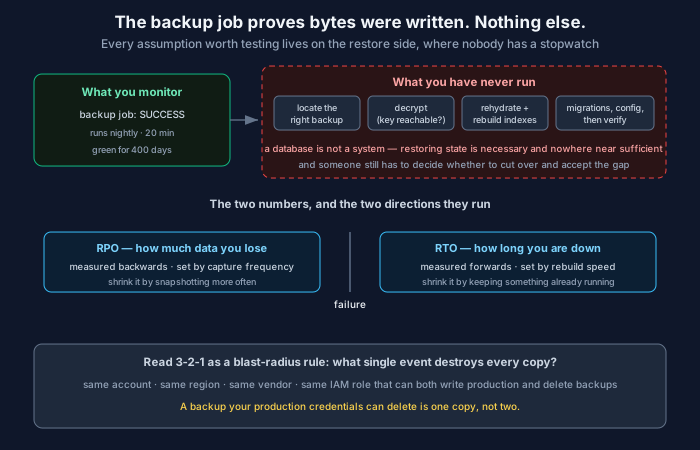
RPO — recovery point objective. How much data you can afford to lose. Measured backwards from the failure. An RPO of one hour means that when things go wrong, you accept that up to the last hour of writes are gone.
RTO — recovery time objective. How long you can afford to be down. Measured forwards from the failure.
They’re independent, they’re bought with different money, and the business usually cares about them very differently. A payments ledger might tolerate four hours of downtime and zero data loss. An analytics warehouse might tolerate a day of lost data and almost no downtime, because stale dashboards are survivable and missing dashboards are not.
RPO is set by how often you capture state. Want a smaller RPO? Capture more often — more frequent snapshots, or continuous WAL shipping, which gets you to seconds. That’s a storage and write-amplification cost.
RTO is set by how fast you can rebuild. Want a smaller RTO? Have something already running — a warm standby, a read replica you can promote. That’s a compute cost, paid continuously, for a thing that does nothing most of the time.
The mistake I see most often is a single “backup policy” that names one number for everything. A policy that gives your ledger and your logging cluster the same RPO is simultaneously overpaying for one and under-protecting the other, and it will be discovered in the worst possible circumstances.
What the drill will actually teach you
Here’s what tends to go wrong, roughly in the order you’ll hit it.
You can’t find the right backup. Not because it’s missing, but because there are four backup systems — the RDS automated snapshots, the nightly dump someone set up in 2023, the volume snapshots from the infra team, and a pg_dump in an S3 bucket owned by a team that no longer exists. Nobody is sure which one is authoritative. Picking takes forty minutes, and you pick partly on vibes.
The restore is much slower than the backup. This surprises people every time. Backups are often incremental and run against a warm page cache. Restores are full, cold, and frequently single-threaded. A 2 TB database that backs up in twenty minutes can take six hours to restore, because you’re not just moving bytes — you’re rebuilding indexes, replaying WAL, and waiting on IOPS limits that were sized for steady state, not for a full rehydration.
If your stated RTO is two hours and the restore alone takes six, your RTO is a work of fiction. That single measurement is usually worth the whole exercise.
The data restores and the system still doesn’t work. The database is back. The application won’t start, because the schema is from before a migration that ran last Tuesday, or a config value lives in a secrets manager that’s also down, or there’s a reference to a queue that’s been drained. A database is not a system. Restoring state is necessary and nowhere near sufficient, and this is the gap that turns a four-hour recovery into a two-day one.
The encryption key is inside the thing that’s down. This one is almost funny until it happens. Backups are encrypted — good. The key is in the KMS of the account that just got locked, or in the Vault cluster that depended on the database you’re trying to restore. Circular dependency, discovered at the worst time. Write down where the key lives, confirm it’s reachable when the primary environment is not, and test that specific path, because it is the one failure here that is completely unrecoverable.
Nobody knows who decides. The restore is ready. It’s eleven hours stale. Cutting over means losing eleven hours of writes; not cutting over means staying down. Who makes that call? If the answer is “we’d escalate,” you haven’t got a plan, you’ve got a hope. Name the role in advance.
Backup success is not the signal you think
A backup job reporting success proves bytes were written somewhere. That’s it.
It does not prove the bytes are readable. It does not prove they’re complete — a pg_dump that hit a permissions error on one schema can exit zero and silently omit it. It does not prove the data is correct, which matters enormously for the failure mode where you’re not restoring from a disk crash but from corruption, and the corruption has been faithfully backed up every night for three weeks.
That last one is the case people plan for least and hit most. Hardware failure is rare and loud. Silent corruption, a bad migration, an agent with delete permissions — those are quiet and they propagate into every backup you take afterwards. Your retention window is the real defence, and it’s only as good as your ability to notice the problem before the clean copies age out.
So three things are worth automating:
A checksum or row-count verification after each backup, compared against the source. Cheap, and catches silent truncation.
A periodic automated restore into a scratch environment, with a query run against it that proves the data means something — not just “the database started” but “this known row has this known value.” Several managed services can do this on a schedule now; if yours can’t, a weekly job is a few dozen lines.
Alerting on the absence of a backup, not just the failure of one. A cron that stopped firing produces no failure alert at all, which is why “we haven’t had a backup in six weeks” is a sentence people actually say out loud.
3-2-1, read as a blast-radius rule
The old rule — three copies, two media types, one off-site — gets dismissed as tape-era advice. The underlying idea translates directly: no single event should be able to destroy every copy.
Read your setup that way and ask what the shared failure is.
If production and backups live in the same cloud account, the shared failure is the account. A compromised root credential, or a billing suspension, takes both.
If the same IAM role can write to production and delete from the backup bucket, the shared failure is that role — and that’s precisely the path a ransomware operator or a confused agent with too many permissions takes. Backups should be written by one identity and deleted by nobody, with object lock or immutability enabled so that “delete” is not an operation the production environment can perform at all.
If every copy is in one region, the shared failure is the region.
If every copy is in one vendor, the shared failure is the vendor — and that is a real consideration now in a way it wasn’t a decade ago, though for most organisations it ranks below the first three.
You don’t need to fix all of them. You do need to be able to say which ones you’ve accepted.
Making it routine
The reason restore drills don’t happen is never that people think they’re a bad idea. It’s that they’re unscheduled, they take a half-day, and there is always something more urgent. So the only version of this that works is the boring one: put it on the calendar, make it quarterly, and treat the result as a measurement rather than an exam.
Three things make the drill worth more:
Time it, and write the number down. You are producing a measured RTO to compare against the stated one. If those two numbers disagree, that’s the finding — and it’s a finding you can take to whoever set the stated number.
Have someone unfamiliar run it, using only the runbook. If the drill is run by the person who built the system, you’re testing their memory, which will not be available at 3am on a holiday. The gap between what the runbook says and what the expert knows is the actual risk, and this is the only way to see it. This is the same reason runbooks that are stale lie to anyone reading them, human or otherwise.
Fix one thing afterwards, immediately. Not all of it. One. The drill produces a list of five problems and the temptation is to write a document about them; the document will not restore your database. Pick the worst one, fix it that week, and let the next drill find the next one.
Run it twice and the second one is noticeably less alarming. Run it four times and it becomes a genuinely boring afternoon, which is the goal — not because boring is pleasant, but because boring means the system has stopped surprising you. A backup you have restored is a capability. Until then it’s a line item and a hope.
Related: Write-Ahead Logging: How a Database Survives Being Killed Mid-Write · Secrets Management: Scope, Lifetime, and Blast Radius · SLI, SLO, SLA, and error budgets
Comments