GET /orders?page=37&per_page=50 might be the most natural API anyone has ever designed. It maps to LIMIT 50 OFFSET 1800, the frontend gets page numbers for free, and it works perfectly in every test you’ll write.
It has two bugs, though. One shows up when somebody writes to the table while a client is paging. The other shows up when the table gets big. Neither will show up in your test suite, because your test data doesn’t change halfway through a test and doesn’t have half a million rows.
Here’s both, reproduced, and the fix.
The demo
Five hundred thousand orders in SQLite, sorted newest first. Three orders share each timestamp, on purpose, because real timestamps collide more often than people expect.
import base64, json, sqlite3, time

db = sqlite3.connect(":memory:")
db.execute("CREATE TABLE orders (id INTEGER PRIMARY KEY, created_at INTEGER NOT NULL, total INTEGER)")
db.execute("CREATE INDEX orders_created ON orders (created_at DESC, id DESC)")
# 500k orders; several share each timestamp, so created_at alone isn't unique
db.executemany("INSERT INTO orders (created_at, total) VALUES (?, ?)",
               ((1_700_000_000 + i // 3, i % 997) for i in range(500_000)))


def offset_page(offset, limit=5):
    return [r[0] for r in db.execute(
        "SELECT id FROM orders ORDER BY created_at DESC, id DESC LIMIT ? OFFSET ?",
        (limit, offset))]


def encode(row):   # opaque to clients: they must not build or parse it
    return base64.urlsafe_b64encode(json.dumps({"t": row[1], "id": row[0]}).encode()).decode()


def keyset_page(cursor=None, limit=5):
    if cursor is None:
        rows = db.execute("SELECT id, created_at FROM orders "
                          "ORDER BY created_at DESC, id DESC LIMIT ?", (limit,)).fetchall()
    else:
        c = json.loads(base64.urlsafe_b64decode(cursor))
        rows = db.execute("SELECT id, created_at FROM orders "
                          "WHERE (created_at, id) < (?, ?) "
                          "ORDER BY created_at DESC, id DESC LIMIT ?",
                          (c["t"], c["id"], limit)).fetchall()
    return [r[0] for r in rows], (encode(rows[-1]) if rows else None)


# --- 1. Correctness: a new order arrives between page 1 and page 2 ----------
p1 = offset_page(0)
db.execute("INSERT INTO orders (created_at, total) VALUES (?, ?)", (1_800_000_000, 42))
p2 = offset_page(5)
print("offset  page1", p1)
print("offset  page2", p2, "<- duplicate:", sorted(set(p1) & set(p2)))

db.execute("DELETE FROM orders WHERE created_at = 1800000000")
k1, cur = keyset_page()
db.execute("INSERT INTO orders (created_at, total) VALUES (?, ?)", (1_800_000_000, 42))
k2, _ = keyset_page(cur)
print("keyset  page1", k1)
print("keyset  page2", k2, "<- duplicate:", sorted(set(k1) & set(k2)))
print("cursor sent to the client:", cur)

# --- 2. Cost: deep pages -----------------------------------------------------
def timed(fn, *a):
    t = time.perf_counter()
    for _ in range(20):
        fn(*a)
    return (time.perf_counter() - t) / 20 * 1000

deep = db.execute("SELECT id, created_at FROM orders ORDER BY created_at DESC, id DESC "
                  "LIMIT 1 OFFSET 449999").fetchone()
print(f"\noffset 0        {timed(offset_page, 0):7.3f} ms")
print(f"offset 450,000  {timed(offset_page, 450_000):7.3f} ms")
print(f"keyset, same depth {timed(keyset_page, encode(deep)):7.3f} ms")

for label, sql, args in [
    ("offset", "SELECT id FROM orders ORDER BY created_at DESC, id DESC LIMIT 5 OFFSET 450000", ()),
    ("keyset", "SELECT id FROM orders WHERE (created_at, id) < (?, ?) ORDER BY created_at DESC, id DESC LIMIT 5", (deep[1], deep[0])),
]:
    plan = " | ".join(r[3] for r in db.execute("EXPLAIN QUERY PLAN " + sql, args))
    print(f"plan {label}: {plan}")
offset page1 [500000, 499999, 499998, 499997, 499996]
offset page2 [499996, 499995, 499994, 499993, 499992] <- duplicate: [499996]
keyset page1 [500000, 499999, 499998, 499997, 499996]
keyset page2 [499995, 499994, 499993, 499992, 499991] <- duplicate: []
cursor sent to the client: eyJ0IjogMTcwMDE2NjY2NSwgImlkIjogNDk5OTk2fQ==
offset 0 0.001 ms
offset 450,000 1.813 ms
keyset, same depth 0.006 ms
plan offset: SCAN TABLE orders USING COVERING INDEX orders_created
plan keyset: SEARCH TABLE orders USING COVERING INDEX orders_created (created_at<?)That’s the real output, on SQLite 3.35.
Bug one: the offset is a count, not a place
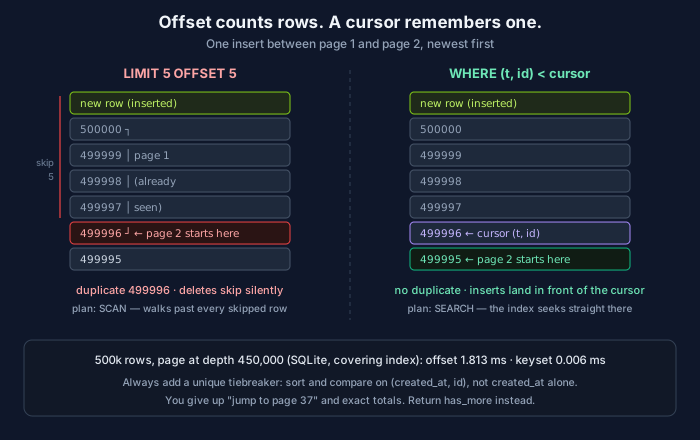
The client fetched page one: orders 500000 down to 499996. Then one new order arrived. It sorts to the front, so every existing row slides down one position. “Skip 5” now lands on 499996 again, and the client sees it twice.
Deletes do the opposite. Remove a row the client has already passed and everything slides up one; the item that was going to be first on page two moves into page one’s slot, and the client never sees it. No error, nothing in the logs. It’s just missing.
Duplicates are annoying. Skips are worse, because nobody notices them. Think of a sync job paging through “all invoices updated since yesterday” while invoices keep getting updated. Or an export, or an AI agent summarizing every open incident through a paginated tool. Every one of those can quietly drop records, and the output looks complete.
The keyset version doesn’t care. Its cursor says “after order 499996”, so the new order sorts in front of where the client already is, and page two picks up at 499995.
Bug two: deep pages cost more
OFFSET 450000 doesn’t mean “jump to row 450,000.” There’s no way to jump to a row count. The database produces 450,005 rows in order and throws away the first 450,000. The plan says it: SCAN. Keyset says SEARCH, because “rows less than (t, id)” is a range the index can seek straight into.
The absolute numbers here are tiny because this is an in-memory SQLite database with a covering index. Ignore the milliseconds and look at the shape: offset cost grows with depth, keyset cost doesn’t. Put this on a real database with row lookups, a wider table and concurrent traffic, and the deep pages are the ones that show up in your slow-query log. They’re usually being hit by a crawler or a sync job, not a human.
Getting keyset right
Always add a tiebreaker. My data has three orders per timestamp. With WHERE created_at < ? alone, the rows sharing the boundary timestamp either repeat or vanish, depending on which comparison you pick. Sort by (created_at, id) and compare on the pair. The primary key makes every position unique.
The index has to match the sort. ORDER BY created_at DESC, id DESC wants an index on (created_at DESC, id DESC) or one the planner can scan backwards. If it doesn’t have one, keyset pagination still returns the right rows, but you’ve lost the performance half of the argument.
Check how your planner handles row values. (created_at, id) < (?, ?) is standard SQL and PostgreSQL uses a composite index for it. Some planners handle it less well. The expanded form, created_at < ? OR (created_at = ? AND id < ?), means the same thing. Check your plan, don’t assume.
Designing the cursor
The cursor in the demo is base64-encoded JSON. A few rules make it hold up in production.
Opaque to clients. Document it as an opaque string. If clients start building or parsing cursors, you can never change the format. Base64 isn’t security, but it’s a strong hint.
Bound to the query. A cursor from ?sort=created_at used with ?sort=total is meaningless. Put the sort and filters (or a hash of them) inside the cursor and reject a mismatch with a 400, rather than returning plausible-looking garbage.
Versioned. Add a v field now. You’ll change the sort key eventually.
Signed, if it matters. If a cursor carries anything you don’t want clients editing (a tenant ID, a snapshot timestamp), HMAC it. Otherwise someone will edit it to see what happens.
A response shape that works:
{
  "data": [ { "id": "ord_499996", "created_at": "2023-11-16T20:31:05Z" } ],
  "next_cursor": "eyJ0IjogMTcwMDE2NjY2NSwgImlkIjogNDk5OTk2fQ==",
  "has_more": true
}
You’re in good company with this. Stripe’s list endpoints page with starting_after and ending_before object IDs and return has_more. Slack’s Web API returns a next_cursor in response_metadata. MCP’s list operations, tools/list included, use an opaque nextCursor, so any MCP server you build is already doing cursors whether you thought about it or not.
What you give up
Random access. You can’t jump to page 37. In practice almost nobody wants page 37; they want “next,” “previous,” and search. If your UI really needs page numbers, it’s probably a small admin table, and offset is fine there.
Exact totals. “Showing 1–50 of 1,284,113” costs a full count over every matching row, and on a busy table that count is wrong by the time it renders anyway. Return has_more. If someone insists on a number, give them an approximate one or compute it asynchronously.
Free backwards paging. “Previous” needs the mirror-image query: WHERE (created_at, id) > (?, ?) ORDER BY created_at ASC, id ASC, then reverse the results. That’s Stripe’s ending_before. It’s a few lines, but it’s a few lines you have to write.
When offset is fine
Small tables, admin screens, data that doesn’t change while someone is paging through it, and UIs that genuinely need “jump to page.” If the dataset is a few thousand rows that change weekly, LIMIT/OFFSET is simpler and nobody will ever see the bug.
But if a machine is going to page through your API (a sync job, an integration, an agent), assume it will go deep, run while you’re writing, and never notice a skipped row. That’s exactly the client cursors were built for.
Related: REST vs. GraphQL APIs – how to choose? · Idempotency Keys: The Thing That Makes a Retry Safe · B-tree vs LSM-tree: The Two Ways Databases Store Your Data
Comments