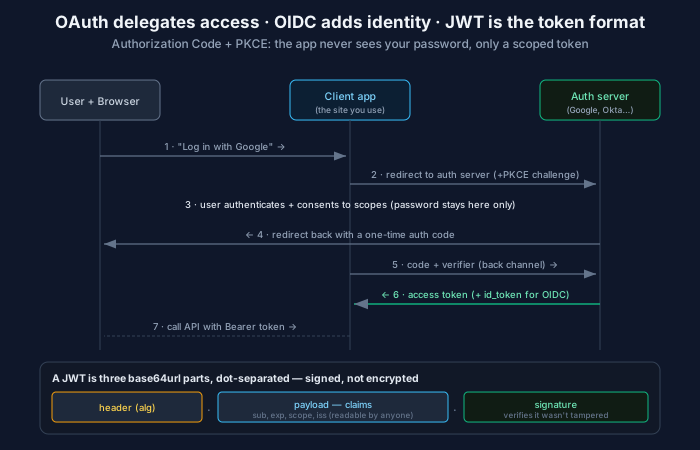
Three terms get used as if they’re synonyms — OAuth, OIDC, JWT — and they’re not even the same kind of thing. One is a way to delegate access, one is a way to prove identity, and one is a file format for tokens. Confusing them isn’t pedantry; the mix-ups produce real security bugs, including some famous ones.
Here’s the one-line map, and the rest of this post is just unpacking it:
OAuth 2.0 decides what an app may do. OpenID Connect decides who the user is. JWT is how the token is written down.
OAuth 2.0: delegated access, not login
OAuth exists to answer a specific question: how does an app get permission to do something on your behalf, in another system, without you handing it your password?
Concrete case: a photo-printing site wants the photos in your Google account. The bad old way was to type your Google password into the printing site. OAuth replaces that. You’re redirected to Google, you authenticate there (the printing site never sees your password), you consent to a specific, limited scope (“read your photos” — not your email, not delete), and the printing site receives an access token that grants exactly that and nothing more.
Four ideas make OAuth work, and they’re worth naming because everything else is detail:
- Delegation — you grant an app a subset of your access without sharing your credentials.
- Scopes — permissions are granular and explicit, so a token is limited to what was consented.
- The access token — a bearer credential meaning “whoever holds this may do these things.” Short-lived by design.
- Separation of roles — the thing that holds your password (the authorization server) is separate from the thing that wants access (the client app).
Note what’s missing: OAuth deliberately never says who you are. An access token means “the bearer may call these APIs,” full stop. That gap is exactly what OIDC fills — and treating an access token as if it proved identity is one of the classic OAuth mistakes.
The flow that matters: Authorization Code + PKCE
OAuth defines several “flows,” but for essentially all interactive apps in 2026 there is one right answer: Authorization Code with PKCE. The diagram above traces it; in words:
- You click “Log in with Google” on the client app.
- The app redirects your browser to the authorization server, including a PKCE challenge — a hash of a one-time secret it just generated.
- You authenticate and consent on the auth server. Your password lives only here.
- The auth server redirects you back to the app with a short-lived, single-use authorization code — not a token.
- The app sends that code, plus the original PKCE verifier, to the auth server over a direct back-channel call.
- The auth server checks the verifier against the earlier challenge and returns the access token (and, for OIDC, an ID token).
- The app calls APIs with the access token in an
Authorization: Bearer …header.
Two properties are the point. The powerful token is exchanged over a back channel, so it never sits in a browser URL or history. And PKCE binds the exchange to the app that started it: an attacker who steals the authorization code in transit can’t redeem it, because they don’t have the verifier. This flow replaced the old Implicit flow, which returned tokens directly in the browser URL — now discouraged for everyone, single-page apps included.
OpenID Connect: the identity layer OAuth left out
Because OAuth got popular, people started abusing it for login — “well, if the app can read my Google profile, that proves who I am, right?” Not reliably, and building login on raw OAuth access tokens caused real vulnerabilities (the confused-deputy and token-substitution problems).
OpenID Connect (OIDC) is the standardized fix: a thin layer on top of OAuth that adds authentication properly. It changes little about the flow — you request an extra openid scope — but you get back one new thing: an ID token.
The ID token is a JWT containing verified claims about the user: sub (a stable unique subject identifier — the thing you key your user records on), often email, name, and importantly iss (issuer), aud (audience), and exp (expiry). This is a token about the user’s identity, issued by an identity provider you trust, meant to be consumed by your app to establish who logged in.
The clean division of labor:
- ID token → answers “who is this user?” Consumed by your app. This is your login.
- Access token → answers “what may the bearer do?” Sent to APIs. This is your authorization.
Use each for its job. Sending the ID token to an API, or trusting an access token as proof of identity, are the two symmetrical mistakes — and both show up in real breach writeups.
JWT: the format, and what it does not do
A JSON Web Token is a compact, self-contained way to represent claims. It’s three base64url-encoded parts joined by dots — header.payload.signature:
- Header — metadata, notably
alg, the signing algorithm. - Payload — the claims:
sub,exp,scope,iss,aud, and so on. - Signature — a cryptographic signature over header + payload.
The single most important fact about a JWT, the one that prevents a whole class of bugs: it is signed, not encrypted. Base64url is encoding, not protection — anyone with the token can decode and read every claim (paste one into a viewer and see). The signature guarantees only that the token wasn’t tampered with and came from a trusted issuer. So two rules follow with no exceptions:
- Never put secrets in a JWT payload. It’s readable by anyone who holds it.
- Always verify the signature before trusting any claim — and check
exp,iss, andaudtoo. An unverified JWT is just a string an attacker can rewrite.
The famous JWT footgun lives here: the alg: none attack and algorithm-confusion attacks, where a library is tricked into skipping verification or verifying an attacker-chosen algorithm. Use a maintained library, pin the expected algorithm, and never let the token’s own header dictate how it’s verified.
The upside of self-contained tokens: an API can validate a JWT without a database lookup — verify the signature, read the claims, done. That statelessness is why JWTs scale well for distributed systems where a central session store would be a bottleneck. The downside is the flip side of the same coin: you can’t easily revoke one. A valid JWT is valid until it expires, because there’s nothing to look up and cross off. Hence the standard pattern below.
Access tokens, refresh tokens, and revocation
Two token lifetimes, on purpose:
- Access token — short-lived (minutes to an hour), often a JWT, sent on every API call. Short life is the revocation strategy: a leaked token stops working soon.
- Refresh token — long-lived, opaque, stored carefully, sent only to the auth server to mint new access tokens. This one you can revoke, and revoking it cuts off future access.
So the answer to “JWTs can’t be revoked” is architectural: keep access tokens short so they expire on their own, and revoke the refresh token to stop renewal. For higher-stakes systems you add a revocation check (a denylist, or token introspection) and accept the statefulness it reintroduces — a direct trade between JWT’s stateless scalability and immediate revocation.
Why this matters beyond human login
This isn’t only about “Log in with Google.” The same machinery is how service-to-service and increasingly agent access should work: OAuth’s client credentials flow issues scoped tokens to non-human callers, which is the standards-based version of the argument that agents need real identities and scoped tokens, not shared API keys. A short-lived, scoped, signed token with an audience and an expiry is exactly the auditable, least-privilege credential you want in front of any resource — whether the caller is a browser, a backend, or an autonomous agent.
The rule worth remembering
OAuth authorizes, OIDC authenticates, JWT encodes — use the access token to call APIs, the ID token to establish identity, and verify every JWT’s signature before you believe a word of it. Most auth bugs are one of these three doing another one’s job. Keep the roles straight and the hard parts get a lot smaller.
Comments